Showing posts with label Product Announcement. Show all posts

Thursday, February 18, 2016

Understand Active View to Increase the Value of Your AdMob Ads

We�ve been advancing measurement standards across the ad industry with Active View, Google�s ad viewability measurement solution, for some time.  In 2012, we introduced Active View and have been extending reporting across our ad platforms, including DoubleClick, so that publishers can get an accurate measure of ad viewability.

Now available in AdMob for the first time, Active View metrics in the AdMob Network report help you understand what portion of your AdMob ads are viewable long enough to potentially be actionable by users. With this data you can increase the viewability of your ads by optimizing how they appear in your app. At this time, the Active View metrics in the AdMob Network report are only for display ads, with metrics for video ads coming soon.

Some background on ad viewability
Generally, viewability is the percentage of ads considered viewable by users out of the total number of ads measured. It�s important because it helps advertisers to understand what percentage of their ads are potentially actionable. Google�s Active View metric counts an ad as viewable if a minimum of 50% of the pixels of the ad are on screen for at least one continuous second for display ads, or two continuous seconds (of video play) for video ads.

Think about this experience on your mobile app. If you place your ads near the bottom of a long screen where users are unlikely to scroll, then your total number of viewable impressions is likely to be lower than if you had placed the ad higher up the screen.

In the report, metrics include the percentage of measurable impressions (eligible impressions that could be measured with Active View), and the percentage of viewable impressions (the percentage of measurable Active View-eligible impressions that were viewable). You can find more details about additional metrics in this AdMob help center article.
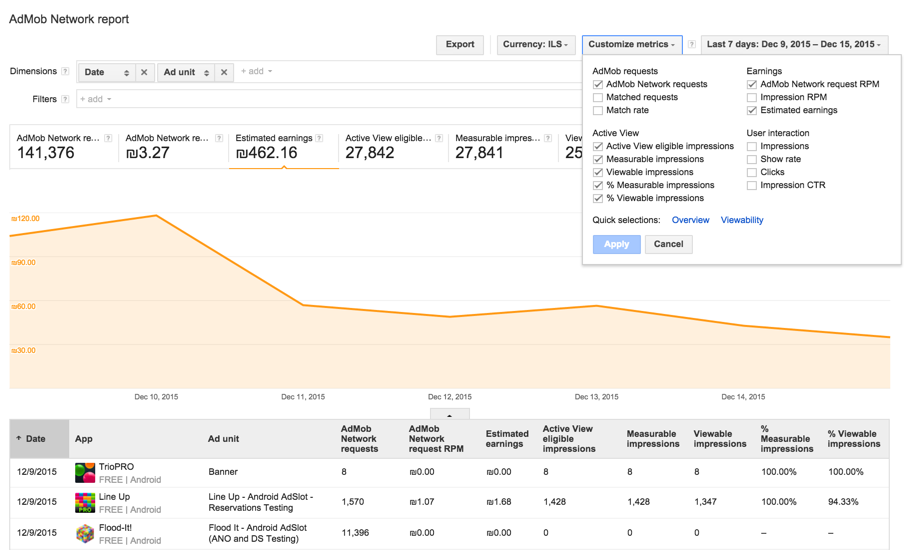
image (6).png
View Active View metrics for your app in the AdMob Network report (top right)
What are the benefits for the ad industry and app developers?
More insights into viewability provide benefits for the ad industry overall. Advertisers get an accurate picture of what percentage of their ads are being seen by users. Based on this knowledge, they can create better ads which are more engaging to users, and also gain insight into which apps are providing the most value to them. For advertisers who are paying by the impression, this can result in more efficient ad campaigns.

Developers stand to benefit by being able to create well-integrated ad experiences in apps to improve user experience which can lead to higher monetization. For example, developers can use this data to place ads in positions where they are more viewable, while still keeping app content engaging and easy to access.

Explore and stay tuned
We invite you to check out the new Active View metrics in your AdMob account, and come back to the Inside AdMob blog for a new series on ad viewability starting in March.

Until then, for more tips on app monetization, follow our Twitter and Google+ pages.

Posted by Sarah Faulkner, Product Manager, AdMob

Tuesday, February 16, 2016

SDK-less Mediation: An easier way to mediate


Publishers have long used mediation to maximize revenue by showing ads sourced from diverse ad networks. However adding new networks required integrating and testing new SDKs - which often led to wasted development resources, app updates, bugs and bloated code. With SDK-less mediation it is now possible to simply add new networks server side without updating their apps.

Today, we�re excited to announce that we�re adding SDK-less mediation to the AdMob and DoubleClick for Publishers platforms. SDK-less mediation is a feature that lets developers add new ad networks without having to integrate additional SDKs or adapters. This is great for developers who are concerned with SDK size or who simply do not want to deal with the hassle of adding and updating new ad network SDKs. With SDK-less mediation, developers can conveniently add new ad networks to their mediation stack.

"AdMob SDK-less allows us to test new networks without updating binaries. It means we can get more expensive traffic from new networks and increase our overall eCPM (and overall income) just by adding new networks and finding most optimal mediation settings (and all these don't require any programming!)." - Victor Negrutsa, CEO, 1C Wireless

As with AdMob�s existing SDK-based mediation, SDK-less mediation will support all existing mediation features including ad network optimization, Live CPM, and country-specific CPM values. Developers using SDK-less will still be able to leverage SDK-based integrations and the two can be combined in the same mediation waterfall. SDK-less networks will have the �SDK-less� suffix on the AdMob interface.

To launch SDK-less, we�re happy to announce our first round of partners: Aarki, Drawbridge, MdotM and Smaato with more coming in the near future.

For more information on technical integration for SDK-less mediation check out our help center. Not mediating yet? It�s easy to set up and takes very little time to manage. With AdMob, you can focus on building great apps while we do the hard work for you. Here�s how you can get started.
For more about AdMob Mediation, visit our help center, and to stay connected on all things AdMob, follow our Twitter and Google+ pages.


Posted by Arun Balaraman,
Group Product Manager

Thursday, December 3, 2015

Introducing new interactive ads to drive app installs

Cross-posted from the Inside AdWords blog.

We�re launching two new immersive ad formats to help advertisers drive app installs. As an AdMob developer you may start to see these new formats appear in your apps. If you opt into �Image� as an �ad type� in your account, you�ll be eligible to show the Interactive Interstitial format, and if you opt into �Text,� your app can begin to serve the Trial Run format. At this time, Interactive Interstitials show on Android and iOS apps, and Trial Run Ads show on Android apps only.


Developers are constantly looking for new ways to bring users to their apps. But because people�s attention on mobile is becoming shorter and more intent-rich, finding engaged users of your app is an ongoing challenge � both before and after an install. In fact, we found that one in four installed apps is never even used. We�ve focused our efforts on offering developers advertising tools that engage users and showcase an app at its best. We recently redesigned one of our in-app ad formats, and are building on our desire to create beautiful app ad experiences. That�s why today we�re introducing two new rich, immersive ad formats to our growing suite of creative app install solutions.

Play a game within an ad with Trial Run Ads
Trial Run Ads are an app ad format that lets a user play a game for up to 60 seconds by streaming content from the app before downloading. The immersive demo increases the likelihood that an install is coming from someone who enjoys playing the game. Users get a taste of the game before going through the download process,  and the app developer attracts better qualified users who�ve chosen the game based on their experiences in the app.

Trial Run Ads provide:
  • Ultra-immersive and delightful ads designed for games
  • The opportunity for gamers to trial before download 
  • More relevant ad clicks, app downloads, and pre-qualified app users
Cookie Jam's Trial Run Ad
Get ultra-creative with customized mobile ads
We�re also launching a beta for Interactive Interstitial ads, which are HTML5 ads that offer a completely customized user experience tailored to each advertiser's app. They give advertisers creative freedom to use HTML5 instead of standard templates and pull in data dynamically. Diversity potential is high with this format and it's not limited to just gaming apps. Interactive Interstitials offer a truly custom experience that can include your app�s value proposition and the functionalities you want to highlight, all painted in your personal branding strategy. This is particularly valuable for advertisers who are looking for higher user engagement in installers.

Interactive Interstitials provide:
  • A beautiful and flexible canvas for the advertiser to become truly creative
  • Unique testing and optimization capabilities
  • The opportunity to bring a piece of the app experience to the user before download
  • Unique brand building possibilities
Marketers are already taking advantage of these engaging ads to drive app installs. Zalora built a an ad that allowed users to swipe to discover an exclusive offer.
Zalora's Interactive Interstitial allows users to use a finger to
swipe a screen to discover a special promotion.
Customization can be as big or small as you want � from adjusting standard templates to developing a fully custom creative. Marketers can also use their live app content to create compelling, real time ad formats. With more control over layout and interaction, you can A/B test creatives and try various CTAs to increase conversions. Rather than just telling a user about your app, you can offer them an experience unique to your app that inspires them to want to spend time with your app.

Advertisers can use Interactive Interstitials to showcase their latest product offerings through galleries, highlight elements of their personal branding, and to more powerfully demonstrate the value of their app before someone installs.
Zalora showcases a gallery of products that users can
swipe through in its Interactive Interstitial ad.
We understand that experiences on mobile need to be made for mobile, and an ad is no different. We�re continually exploring new and better ways to build out interactive formats for the small screen.

Trial Run Ads and Interactive Interstitials are currently in beta and available to a limited set of advertisers. Reach out to your account manager if you are interested in joining the betas.

Posted by Sissie Hsiao, Director of Product, 
Display and Pasha Nahass, Product Manager, Display

Thursday, August 27, 2015

Beautiful New Designs for Full-Screen In-App Ads

Nearly 60% of smartphone users expect their favorite apps to look visually appealing. We�ve always believed that in-app ads can enhance an app�s overall experience by being well designed. So today we�re announcing a completely new look for our interstitial in-app ad formats - also known as full-screen ads - that run on apps in the AdMob network and DoubleClick Ad Exchange.

Inspired by Material Design, the new app install interstitial comes with a beautiful cover photo, a round install button, and matching color schemes. Technology called �color extraction� makes the ads more consistent with the brand's look and feel -- we extract a dominant color either from the cover photo or app icon and apply it to the footer and install button. We found that having a greater variety of designs and colors can improve conversion rate.

Other features include the app�s rating, and a screenshot gallery which appears when a user taps �More images�, so users can learn more about the app without leaving the ad.
New Version of Full-Screen In-App Ads
The previous design of our app install ads on the left, and our new version on the right.
Different Examples of Color Matching for Full-Screen In-App Ads
Different examples of color matching.             
Our app install formats have driven more than a billion downloads across Android and iOS. You can use these new designs automatically when you run a mobile app install campaign on the AdMob network in AdWords. That�s right, no extra work required!

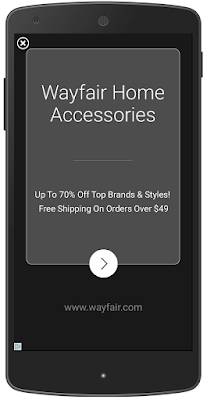
Next, our new text-based ads are easier to read, and contain a larger headline and a round call-to-action button that clicks through to a website.
prev_wayfair.png               new_wayfair.png


On the left, the previous text ad interstitial design, and the new version on the right. 

As with other ad format innovations, our ads UI team test multiple designs - ten in this case over the course of a year - to find final versions that increase clicks and conversions for advertisers, and a positive experience for users. Both app install and text ad formats appear within the app and can be closed easily, so users can return to what they were doing with a single tap.

As we announced at Google I/O this year, the volume of interstitial impressions has more than doubled across AdMob since last July, so now�s a great time to get your business in front of more app users.

If you�re a developer looking to learn more about earning with in-app interstitial ads in your app, visit AdMob now. These new designs will also be available to developers monetizing their apps with DoubleClick Ad Exchange.


Posted by Pasha Nahass, Product Manager

____________________________
1) Mobile App Marketing Insights: How Consumers Really Find and Use Your Apps, Google & Ipsos Media CT, May 2015

Thursday, May 28, 2015

New AdMob tools help you build a smarter, faster mobile app business

There are many different ways for developers to make money from mobile apps. Paid downloads have been a popular choice among developers, but with only a third of users willing to pay1, increasingly apps are free Now, more and more developers are making money with in-app advertising and freemium models, with revenue for both growing over 70% from 2013 to 2014.2

That�s why today, at our annual I/O conference, we announced a set of tools to help you create smarter ways to monetize through segmentation, scale your business through reservations and integrate rich ad formats into apps more easily.

Smarter tools for greater success
As a developer, you want to know your most valuable users and be able to create different experiences for them in your app. Recently we launched the Audience Builder tool, powered by Google Analytics, that enables you to segment users based on how they are using your app. Now we�re announcing a new smart feature in beta, that enables you to define a list of users and show ads to them, while hiding ads from the rest of your users. For example, you might show ads to casual users, but hide ads from highly-engaged users who love sharing your app with their friends on social networks. If you�d like to be considered for this beta, please sign up here.

Audience Builder Screenshot

Targeting ads to an audience in AdMob
Smarter monetization should mean earning the most revenue possible, and AdMob�s free mediation tool has helped many developers run other mobile ad networks through the AdMob platform to simplify management and improve competition. Today we announced that AdMob mediation now supports 40 mediation partners, with 15 networks added in the past year alone. We're pleased to welcome Tencent GDT as our newest mediation partner, one of the largest mobile ad networks in China.

Helping you scale your app faster
Many app businesses with global reach and scale are growing very quickly in the ecosystem. These apps have dedicated sales teams who work with large advertisers to sell their inventory. Today, we announced a beta to support mobile app sales teams called AdMob Reservations. These sales teams will be able to take ad campaign bookings from advertisers they work with directly, upload ad creatives, and manage the delivery of these campaigns for free, using the AdMob platform.

Fast-growing app developers are choosing AdMob to monetize. Last week, Etermax, who created one of the world�s most popular trivia games in Trivia Crack, became one of our newest partners.

Making ad integration easier
We want to bring native ads to more app developers in a scalable way and with minimum fuss, so we�re improving our ability to serve these types of ads. In the coming months, we�ll be introducing Native Ads Express, a new way to take advantage of native ads that requires no custom engineering work by you. We know there are many developers who don�t have the resource to design a custom native ad that matches their app, but still want the flexibility that native ads offer. With this feature you can simply define the style of your ad using CSS, and AdMob serves the ad adhering to your specs. You can update the ad�s appearance on the fly by adjusting the CSS, so there�s no need to change your app�s native code when you want to test a different look. We have ads from millions of advertisers that can be styled in the way you want.

We�ve already made great strides to help you integrate AdMob ads across platforms with plugins for games engines such as Unity and Cocos2d-x. Now, we�re excited to announce the integration of AdMob into Android Studio. This powerful new feature will let you quickly and easily create AdMob ad units as you build your app.

Android Studio Integration Screenshot
AdMob Ads Activity in Android Studio

At Google, we�re passionate about fostering successful app developers, and as the AdMob platform continues to grow, with over 650,000 apps, we�re continually working to give you the tools you need to build your app business, intelligently. Visit the AdMob website to get started, and put our new monetization tools to work in your apps.

Lastly, if you�re interested in driving app installs and measuring campaign performance, see the latest exciting I/O announcements from our AdWords and Google Analytics teams.


Posted by Jonathan Alferness, 
Vice President, Product Management

______
1. eMarketer, February 2015
2. App Annie, App Annie & IDC Mobile App Advertising and Monetization Trends, March 2015


Monday, March 2, 2015

New AdMob features to help you monetize your app the smart way

Today, at the Game Developers Conference (GDC), we�re announcing three important updates to AdMob that will help developers build a smart monetization experience, and to help marketers reach the right users. We believe the best kind of in-app monetization experiences are the ones customized to individual app users, not a one-size-fits-all approach. Our vision for AdMob is to build a smart platform that makes such a tailored approach possible, or as we like to say, one that�s �audience aware�.
  • AdMob In-App Purchase House Ads are a free, new format that can completely change how you think about your in-app purchase monetization strategy. You can use this format to create a customized ad to promote items to sell to your users, then AdMob�s audience-aware platform will predict those users who are likely to buy, and show them the ad. For all your other users - the ones unlikely to spend - AdMob can show them a regular ad. This approach means you can keep your high-value users engaged in your app, and for everyone else you�re making each impression count towards monetization. Currently in beta, this feature will be coming to all AdMob accounts in the next few weeks.
  • Audience Builder is a powerful tool in AdMob that enables you to create lists of audiences based on how people use your app and then create customized experiences for users, ultimately growing your app revenue. For example, you could create an Audience List that defines those users who have not used your app in 14 days. Import that list into Google AdWords, and you can show ads to this list to re-engage users while they�re in other apps, or across the web. Audience Builder is available in all AdMob accounts now, and you can find out how to get started here.
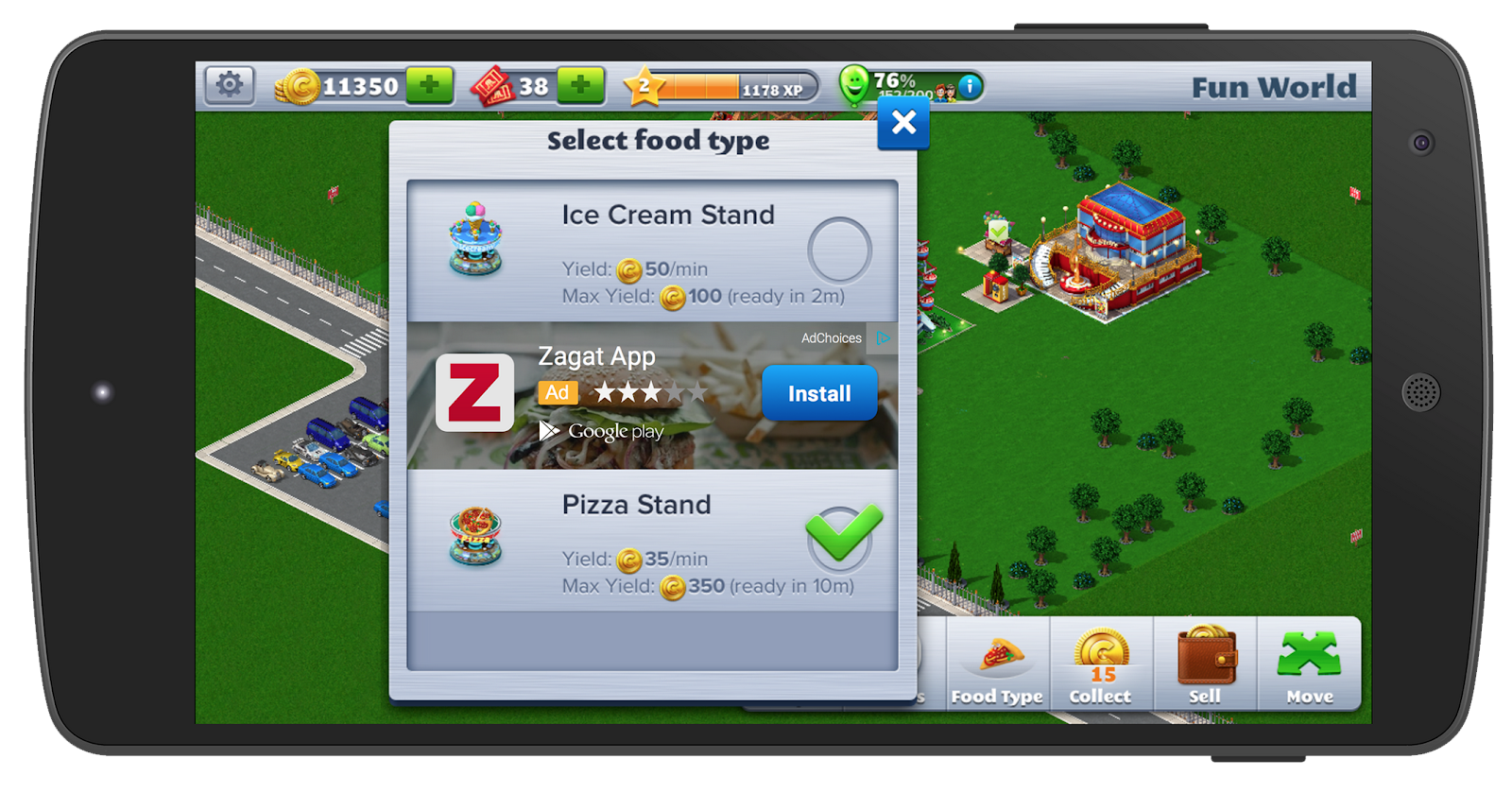
  • AdMob Native Ads are now in limited beta on the AdMob platform. Participating developers will be able to show native ads in their app from Google advertisers, and customize them to match both the form and function of their app. We pay close attention to user experience, so our native ads are designed to be clearly identifiable as ads to users. We�re thrilled to be working closely with Atari to bring native ads to RollerCoaster Tycoon� 4 Mobile; check out the screenshot below with an app install ad for Zagat:
Native-app-install-Ads-Example
  • The user-friendly focus of native ads was an important consideration for Atari�s Chief Operating Officer, Todd Shallbetter: �Atari creates great game experiences for our broad audience. We're happy to be partnering with Google and be the first games company to take part in the native ads beta and help monetize games in a way that enhances our users' experience.'
  • We�re testing native ads on non-gaming apps, too, partnering with developers globally, including CocoPPa in Japan.
These new features in AdMob can provide you with many new ways to supercharge your monetization. You can find out more about them on the AdMob website.

If you�re going to be at GDC, don�t miss my talk on Thursday, �Smart Strategies to Acquire, Retain and Monetize Gamers,� where I�ll be discussing these new features. And if you can�t attend, check out our live sharing on Google+ and Twitter to stay in the loop with what�s happening with #MeetAdMob.


Posted by Jonathan Alferness
Director of Product Management and Global Lead 
for Mobile Display Ads and AdMob

Wednesday, February 11, 2015

Smarter monetization strategies - powered by AdMob�s new reporting tools

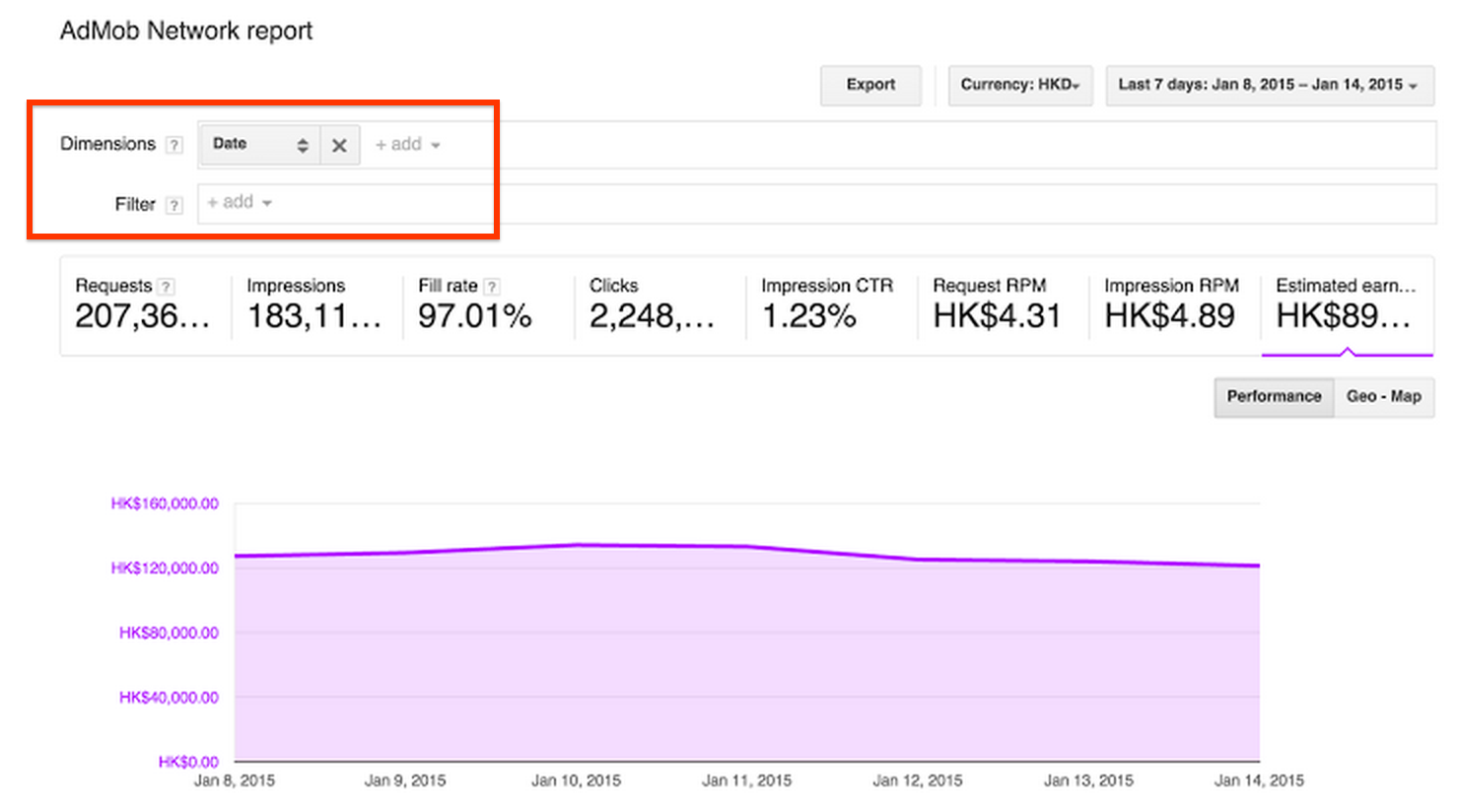
Wouldn�t it be great if you could slice and dice your app performance data and drill down to the most specific and actionable insight to help you monetize smarter? We�d like to to announce a new feature in AdMob to help you achieve that. In the Monetization section of AdMob, you can now directly apply multiple Dimensions and Filters in your Performance Reports and instantly generate customized reports to analyze, for example, the performance of specific apps and ad units in particular regions or countries.
AdMob-Performance-Reports-ScreenShot
By applying dimensions, you can sort or change the types of data shown. Dimensions determine the columns displayed in your report. You can add dimensions to two different performance reports: the AdMob Network report and Admob Mediation report. Below are some example dimensions:
  • AdMob Network report dimensions:
    • Date: View performance by date.
    • App: View performance by app.
    • Targeting type: View performance by targeting type.
  • AdMob Mediation report dimensions:
    • Date: View performance by date.
    • Ad source: View performance by ad source, which measures mediation traffic.
    • Allocation: View performance by allocation within ad slots.
By applying filters, you can hide specific data from your reports. Filters help you find the information you want within the larger report. Below are some example filters:
  • Ad unit
  • Country
  • Ad source
For instance, if you want to compare your new Android app�s banner and interstitial ads in Japan, simply select �Ad Unit� as a Dimension, then add an �App� Filter set as one of your Android apps, and a �Country� Filter set as Japan. The graph and data will refresh immediately to represent this new segment!
AdMob-Network-Report-Screenshot
Check out this new feature today and start refining your monetization strategy now. Refer to Performance Reports help center article for more details, and stay connected on all things AdMob following our Google+ page.

Posted by Sean Meng
AdMob Marketing

Tuesday, October 28, 2014

Monetize your Cocos2d-x games with AdMob

With more than $1 billion paid to app developers in the last two years, AdMob is committed to supporting industry growth. So we are happy to announce that Cocos2d-x developers can now use AdMob to monetize their mobile games!

AdMob has integrated with the AnySDK platform, which means Cocos2d-x developers who use the AnySDK Ads System can now easily include AdMob when publishing their Android and iOS apps.

For details about how to get started, read the full post on the Google Ads Developer Blog.

Posted by Eric Leichtenschlag
Ads Developer Relations Team