Showing posts with label interstitial ads. Show all posts

Thursday, May 26, 2016

Mobile Ads Garage: Episode 4 - Interstitials

The Mobile Ads Garage is a new series that covers how to use the Mobile Ads SDK to display ads from AdMob and Doubleclick For Publishers. Each episode will cover one aspect of the SDK, break down the feature, and show screencasts of real implementations on both Android and iOS � all in a friendly format.

With two episodes on banner ads on the books, the Mobile Ads Garage now turns its focus to interstitial ads.

Andrew and Gary the Graphics Guy are back this week with a detailed explanation of the interstitial ad lifecycle, how to load ads, and how to display at just the right time. Along the way you'll get screencasts of Android Studio and Xcode, plus links to guides, samples, and other resources.


If you like the video, save the Mobile Ads Garage playlist to your YouTube Playlist collection and you'll never miss an episode.

We�d love to hear which AdMob features you�d like to learn more about. The comment sections for the videos are open, and you're welcome to toss out ideas for new episodes and examples you'd like to see. If you have a technical question relating to something discussed in one of the episodes, you can bring it to our support forum.

Thursday, October 29, 2015

Updated Guidance on Implementing AdMob Interstitial Ads

We�ve recently made some updates to our AdMob Help Center to help provide further guidance on implementing interstitial ads. These best practices, along with examples of what you should and shouldn�t do, are designed to help developers implement interstitial ads.

Mobile devices have limited screen size, which means that careful planning for your ad placement is especially important. Improper implementation can lead to accidental clicks, and our goal is to build a strong ecosystem that benefits users, advertisers and developers in the long term.

Our goal is to provide examples which help developers create positive user experiences.  Users should not be overwhelmed with interstitial ads. Repeated interstitial ads often lead to poor user experiences and accidental clicks.

Additionally, users should not be surprised by interstitial ads. Placing interstitial ads so that they suddenly appear when a user is focused on a task at hand (e.g., playing a game, filling out a form, reading content) may lead to accidental clicks and often creates a frustrating user experience.

Finally, ads should not be placed in a way that prevents viewing the app�s core content, nor in a way that interferes with navigating or interacting with the app�s core content and functionality.

More examples and details, along with additional visual examples of best practices can be found on the AdMob Help Center. Here you will find disallowed implementations and recommendations on how to fix interstitial implementations, as well as general interstitial ad guidance.

Subscribe to app development insights from AdMob by Google here.

JohnBrownHeadshot.png

Posted by John Brown
Head of Publisher Policy Communications

Thursday, August 27, 2015

Beautiful New Designs for Full-Screen In-App Ads

Nearly 60% of smartphone users expect their favorite apps to look visually appealing. We�ve always believed that in-app ads can enhance an app�s overall experience by being well designed. So today we�re announcing a completely new look for our interstitial in-app ad formats - also known as full-screen ads - that run on apps in the AdMob network and DoubleClick Ad Exchange.

Inspired by Material Design, the new app install interstitial comes with a beautiful cover photo, a round install button, and matching color schemes. Technology called �color extraction� makes the ads more consistent with the brand's look and feel -- we extract a dominant color either from the cover photo or app icon and apply it to the footer and install button. We found that having a greater variety of designs and colors can improve conversion rate.

Other features include the app�s rating, and a screenshot gallery which appears when a user taps �More images�, so users can learn more about the app without leaving the ad.
New Version of Full-Screen In-App Ads
The previous design of our app install ads on the left, and our new version on the right.
Different Examples of Color Matching for Full-Screen In-App Ads
Different examples of color matching.             
Our app install formats have driven more than a billion downloads across Android and iOS. You can use these new designs automatically when you run a mobile app install campaign on the AdMob network in AdWords. That�s right, no extra work required!

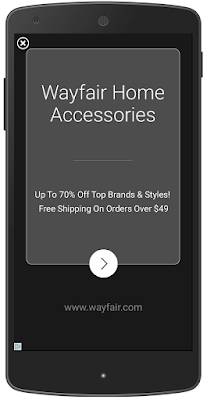
Next, our new text-based ads are easier to read, and contain a larger headline and a round call-to-action button that clicks through to a website.
prev_wayfair.png               new_wayfair.png


On the left, the previous text ad interstitial design, and the new version on the right. 

As with other ad format innovations, our ads UI team test multiple designs - ten in this case over the course of a year - to find final versions that increase clicks and conversions for advertisers, and a positive experience for users. Both app install and text ad formats appear within the app and can be closed easily, so users can return to what they were doing with a single tap.

As we announced at Google I/O this year, the volume of interstitial impressions has more than doubled across AdMob since last July, so now�s a great time to get your business in front of more app users.

If you�re a developer looking to learn more about earning with in-app interstitial ads in your app, visit AdMob now. These new designs will also be available to developers monetizing their apps with DoubleClick Ad Exchange.


Posted by Pasha Nahass, Product Manager

____________________________
1) Mobile App Marketing Insights: How Consumers Really Find and Use Your Apps, Google & Ipsos Media CT, May 2015

Monday, April 13, 2015

Lowdown: Best ways to monetize your messaging app

Lowdown is a regular series that brings you tips and tricks on how to best use AdMob to grow your app business, directly from members of the Google AdMob team.

It�s a fantastic time for messaging apps. Massive company valuations, global user bases, and strong demand for wifi-based communication have incentivized mobile developers to throw their hats into the messaging arena. We�ve seen the features and functionality for these apps become more sophisticated, expanding to delivering virtual goods, coupons, app-discovery, and even social networking. As functionality has expanded, so have the monetization potentials. Here are a few ways to best monetize your messaging app and tips to optimize your setup.

Banner Ads:

The nature of messaging apps make it very conducive for banner ad units. User spend large quantities of time on their menu, contacts and messaging pages, making it easier for users to interact with ads and drive higher engagement from anchored banner units. AdMob�s strong global coverage and year over year eCPM growth in this format can help monetize the market your users operate within.

Interstitials Ads:

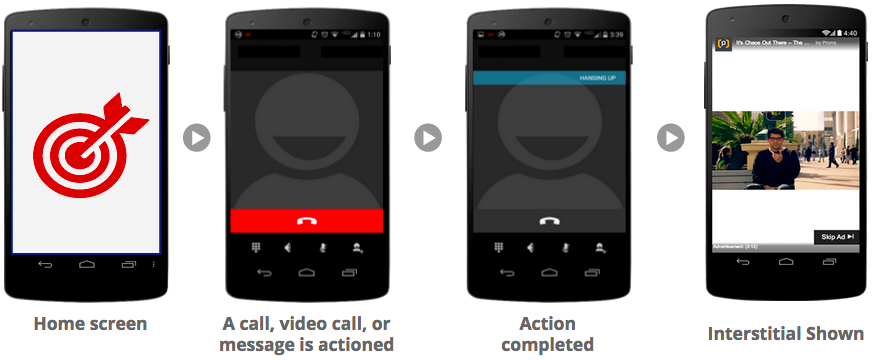
Interstitial ads are not just for gaming apps. Messaging apps also have natural transition points within their user�s flow, perfect for eCPM-driven ad units like interstitials. For example a perfect place for an interstitial ad may be the moment once a user completes a phone or video call and the app transitions back into the main screen. See examples below.

Example of a Great Interstitial Ad Workflow

Interstitial Ad Formats

Targeted In-App Purchases

Messaging apps could offer In-App Purchases (IAPs) in the form of more minutes, credits or virtual goods. Although the traditional conversion rates for these offers have been very low, AdMob automatically figures out which of your users are likely to spend, based on Google�s proprietary data and models. AdMob offers robust IAP functionality, making it easy for you to create IAP offer units and target high potential spenders. You can learn more about this feature here.

A diversified, metrics driven approach can help you to better monetize your messaging app. Visit our website to learn more about how AdMob can help you grow your app business. Until next time, be sure to stay connected on all things AdMob by following our Google+ page.


Posted by Jeff Salvitti
Strategic Mobile Partner Manager

Monday, December 8, 2014

Official AdMob video: implement interstitial ads in the right way to earn more revenue

When monetizing an app with ads, you want to make sure that you�re implementing them in the right way to create a positive user experience. AdMob developers, such as Raon Games, are discovering that interstitial ads are an effective way to monetize. These are full-screen ads appearing at natural transition points in an app.

However, with poor interstitial ad implementations, it's possible to see an increase in accidental clicks. This happens most often when users are not expecting an interstitial ad to appear on the screen (for example, in the middle of a game or on an exit screen). Sometimes we see poor implementations leading us to refund advertisers and disable ad serving until the issue is fixed.

Learn to implement interstitial ads the right way by watching our new best practice video.
For additional guidance, check out our help center page, and stay connected on all things AdMob and more by following our Google+ page.

Posted by Danielle Chang and Pauline Wang
AdMob Policy Team