Showing posts with label Google Analytics. Show all posts

Wednesday, November 25, 2015

How to improve your AdSense performance with Google Analytics

Want to freshen up the AdSense performance on your site? Google Analytics can help. Here are some simple and effective places to start.

1. Find out where to focus

Content Groups let you bundle your offerings to analyze them more clearly. Instead of analyzing all shoes at once, for instance, a shoe company might divide content into shoes for adults and kids, for men and women, or by tennis shoes and high heels. You can view and compare aggregated metrics by group, or drill down to any individual URL or page title.


Suppose you want to know: What topics have the best AdSense CTRs?
  • Group content by topic (such as food, politics and sport)
  • Use the AdSense Pages report to view metrics
Once you learn which topics have the best clickthrough rates, you could then focus on creating more content for those topics.

Suppose you want to know: Which product groups have slow-loading pages?
  • Group products by type (such as shirts and shoes)
  • Use Page Speed reports to look at page load performance
Are some pages very slow? You might focus on fixing uncompressed images to improve the user experience (and your AdSense revenue).

Content Groups are easy to set up. Learn how to create them and then follow these best practices from Google Analytics evangelist Justin Cutroni.

2. Understand where your users arrive and leave

A Landing Pages report can show you how engaged visitors are with your content. You can analyze individual pages or the Content Groups we just talked about.

Suppose you want to know: What pages cause visitors to leave?
  • Look for pages with high bounce rates, this usually indicates content that isn't appealing to visitors or is irrelevant to their needs
  • Try changing the headline of your article or finding better images
  • You may also want to analyze the page speed for pages with high bounce rates; visitors may be giving up on a very slow-loading page 
Both Content Groups and Landing Page reports can help you find underperforming pages on your site and take action to fix them.

3. Get to know your users 

Demographics and Interests data helps you understand the age and gender of your users, as well as their interests based on their online browsing and buying.


Suppose you want to know: How old are my visitors?
  • Try Demographics Report > Age  
  • Check the bounce rate: if it�s high, consider changing the headline or the visuals to make your pages more relevant and engaging for your target audience
Suppose you want to know: What are my users interested in?
  • Try an Interests report
  • Then shape your content based on the user interests you see; if viewers of you tech blog are interested in photography, try publishing more articles on that theme
To get started with the Demographics and Interests reports, enable them in your Analytics account.

The key to making your site better is to jump into the data, have fun, and experiment. Find out what works and do more of it. Have any ideas to share about using these reports? Add them in the comments below!

Not yet an AdSense user? Sign up now!


Posted by Stephen Dunleavy
AdSense Analytics Expert

Monday, November 23, 2015

[Infographic] Are you prepared for the busiest quarter of the year?

The holiday season is the busiest time of the year, with shoppers out in full force to gather their holiday gifts, round up their decorations, and treat themselves to something special. 2014 was a record-breaker in terms of ad spend, which goes to show just how important it is that your advertising is as targeted as possible, and that you�re fully prepared for the final, and most lively, quarter of the year.

Check out these stats and tips below which can help you be in tip-top form for the season:
(viewing from mobile? Download it here.)

Not yet an AdSense user? Sign up now!


Posted by Yigit Yucel
Marketing Communications Specialist

Thursday, August 6, 2015

[NEW VIDEO] What�s the most important growth metric for your app?

In this week�s App-etizers, Max shares what�s the most important growth metric for your app. If you�ve been following the series, we last recently discussed how the secret to rapid growth is to not focus on growth at first, but instead focus on user engagement. Likewise, the most important growth metric to focus on isn�t a traditional growth metric at all. Watch the episode to learn more:

To discover more insights about app growth, download our eBook, The No-Nonsense Guide to Growing Your Mobile App. Until next time, be sure to stay connected on all things AdMob by following our Twitter and Google+ page.


Posted by Raj Ajrawat
Product Specialist, AdMob

Thursday, June 4, 2015

AdMob at Google I/O: Catch Up on Our Announcements

We hope you had a fun time tuning into Google I/O this year. If you weren�t able to yet, be sure to check out our talk on Smarter Monetization with AdMob and Google Analytics. In the video we share how AdMob helps you not just earn revenue from your app, but earn the most revenue. The talk covers many of our new features that puts this logic into action. Features such as targeted In-App Promotion ads and Custom Audience Targeting, which enables you to segment users of your app and determine who sees ads and who doesn't. If you�re interested in being a beta tester for this feature, please sign up here.

Posted by Mike Schipper
AdMob Marketing

Thursday, May 28, 2015

New AdMob tools help you build a smarter, faster mobile app business

There are many different ways for developers to make money from mobile apps. Paid downloads have been a popular choice among developers, but with only a third of users willing to pay1, increasingly apps are free Now, more and more developers are making money with in-app advertising and freemium models, with revenue for both growing over 70% from 2013 to 2014.2

That�s why today, at our annual I/O conference, we announced a set of tools to help you create smarter ways to monetize through segmentation, scale your business through reservations and integrate rich ad formats into apps more easily.

Smarter tools for greater success
As a developer, you want to know your most valuable users and be able to create different experiences for them in your app. Recently we launched the Audience Builder tool, powered by Google Analytics, that enables you to segment users based on how they are using your app. Now we�re announcing a new smart feature in beta, that enables you to define a list of users and show ads to them, while hiding ads from the rest of your users. For example, you might show ads to casual users, but hide ads from highly-engaged users who love sharing your app with their friends on social networks. If you�d like to be considered for this beta, please sign up here.

Audience Builder Screenshot

Targeting ads to an audience in AdMob
Smarter monetization should mean earning the most revenue possible, and AdMob�s free mediation tool has helped many developers run other mobile ad networks through the AdMob platform to simplify management and improve competition. Today we announced that AdMob mediation now supports 40 mediation partners, with 15 networks added in the past year alone. We're pleased to welcome Tencent GDT as our newest mediation partner, one of the largest mobile ad networks in China.

Helping you scale your app faster
Many app businesses with global reach and scale are growing very quickly in the ecosystem. These apps have dedicated sales teams who work with large advertisers to sell their inventory. Today, we announced a beta to support mobile app sales teams called AdMob Reservations. These sales teams will be able to take ad campaign bookings from advertisers they work with directly, upload ad creatives, and manage the delivery of these campaigns for free, using the AdMob platform.

Fast-growing app developers are choosing AdMob to monetize. Last week, Etermax, who created one of the world�s most popular trivia games in Trivia Crack, became one of our newest partners.

Making ad integration easier
We want to bring native ads to more app developers in a scalable way and with minimum fuss, so we�re improving our ability to serve these types of ads. In the coming months, we�ll be introducing Native Ads Express, a new way to take advantage of native ads that requires no custom engineering work by you. We know there are many developers who don�t have the resource to design a custom native ad that matches their app, but still want the flexibility that native ads offer. With this feature you can simply define the style of your ad using CSS, and AdMob serves the ad adhering to your specs. You can update the ad�s appearance on the fly by adjusting the CSS, so there�s no need to change your app�s native code when you want to test a different look. We have ads from millions of advertisers that can be styled in the way you want.

We�ve already made great strides to help you integrate AdMob ads across platforms with plugins for games engines such as Unity and Cocos2d-x. Now, we�re excited to announce the integration of AdMob into Android Studio. This powerful new feature will let you quickly and easily create AdMob ad units as you build your app.

Android Studio Integration Screenshot
AdMob Ads Activity in Android Studio

At Google, we�re passionate about fostering successful app developers, and as the AdMob platform continues to grow, with over 650,000 apps, we�re continually working to give you the tools you need to build your app business, intelligently. Visit the AdMob website to get started, and put our new monetization tools to work in your apps.

Lastly, if you�re interested in driving app installs and measuring campaign performance, see the latest exciting I/O announcements from our AdWords and Google Analytics teams.


Posted by Jonathan Alferness, 
Vice President, Product Management

______
1. eMarketer, February 2015
2. App Annie, App Annie & IDC Mobile App Advertising and Monetization Trends, March 2015


Saturday, March 14, 2015

Why do users stop using your app and how do you keep them from leaving?

Lowdown is a weekly series that brings you tips and tricks on how to best use AdMob to grow your app business, directly from members of the Google AdMob team.

Keeping users on your app is just as difficult as getting downloads. What kind of users abandon you? Why do they stop? What needs to change to keep them engaged? These are all critical questions that are hard to find clear answers to. Fortunately, Google Analytics for mobile apps and a methodical, metrics-driven approach can help. We�d like to introduce you to two key reports within Google Analytics that will help guide you towards increased retention.

Finding Design Flaws: Behavior Flow Report

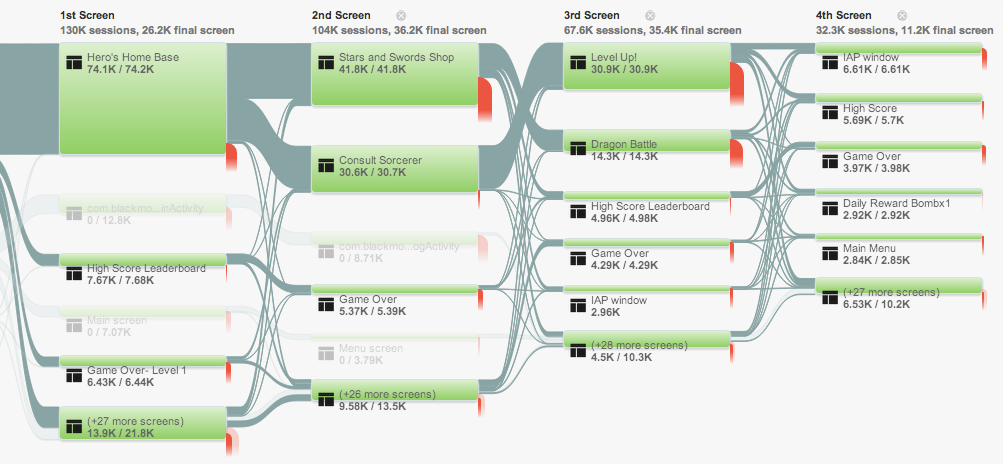
Users might have stopped using your app because of design flaws. Behavior Flow report, a type of report within Google Analytics, can help you identify sticking points and take targeted action.
The Behavior Flow report measures the various screens or events that users visit within your app and provides you with the percentage of people who go on to engage other screens or drop off altogether. This makes clear:

  • What screens users are seeing
  • Which ones are most popular
  • How long users stay on each screen
  • How they navigate from one screen to the next


This information can help you in a number of ways. For example, if you had a game app and each of your game�s levels used a different screen, you could track what percentage of people pass through each level. If there�s a level that has massive user drop-off, that may indicate that the level is too hard. Further, you may find that the exit rate on the �Game Over� screen is particularly high. This could mean that the image or text isn�t incentivizing users to play the game again. You can learn more about this report in the �Know your Flows� section here. 
Google-Analytics-App-Behavior-Flow- Report-Screenshot
Finding Technical Flaws: Crash and Exceptions Report

Aside from design flaws, technical flaws could be causing your users to give up on your app. This where the Crashes and Exceptions reports comes in handy. In this report, data can be broken out by app version, operating system, and device brand, so you can evaluate your app�s technical performance in different environments. To take it one step further, you may want to consider how much crashes are costing you. You can do this by creating two segments: one for sessions with crashes and another without. Then compare the eCommerce conversion rate and average order value of the segments to see if these metrics are lower in sessions with a crash. More information about Crashes and Exceptions can be found here.
Google-Analytics-App-Crashes-Exceptions-Flow-Report-ScreenShot
A metrics-driven approach can help you prioritize your team�s next steps. With our integration of Google Analytics for mobile apps in AdMob, we are making it easier to discover trends and take action that will tie directly to your most important goals. Visit our website to learn more about how AdMob can help you understand your users. Until next time, be sure to stay connected on all things AdMob by following our Google+ page.


Posted by Sarah Xie
Mobile Strategic Partner Manager

Wednesday, March 4, 2015

How do you find your most active users and keep them engaged?

Lowdown is a weekly series that brings you tips and tricks on how to best use AdMob to grow your app business, directly from members of the Google AdMob team.

Paul Buchheit, the Googler behind Gmail and now partner at Y Combinator, is famous for emphasizing that, �It�s better to make something a small number of people love, than something a large number of people don�t care about.� This is absolutely true for your app business. Scaling something mediocre isn�t going to fare well for your business in the long run. Its crucial not to settle for exclusively measuring fluffy metrics like overall downloads or general traffic. You�ve got to dig deeper to find out who�s using your app the most, what they love about it, and eventually double down on what�s working well. We�d like to introduce you to two key reports from Google Mobile App Analytics that will help you to do just that.

Loyalty Report within Google Analytics

The Loyalty Report within Google Analytics shows you the number of sessions for the nth occurrence in your app. You�ll see the number of �1st interactions� with your app, then the number of �2nd interactions�, then the number of �3rd interactions�, and so on.

This report can help you determine at what point in your app users drop off. For example, your Loyalty Report may show you that users with fewer than three sessions have lower conversion rates.

With this information, there are many tests that you can run. You could go through the app yourself to see if there�s anything within the user experience that hinders engagement past 3 sessions. You could segment the users that drop off before 3 sessions and investigate whether they share any common attributes�maybe they came from a marketing campaign that�s bringing in the wrong audience or there could be a language difference. You could even try to use advertising to motivate users early with incentives.

By clearly recognizing the engagement drop off point in your app, you can begin to take methodical action towards increasing engagement. Check out the help desk for more detailed information.
Google Analytics Loyalty Report Screenshot
Recency Report within Google Analytics

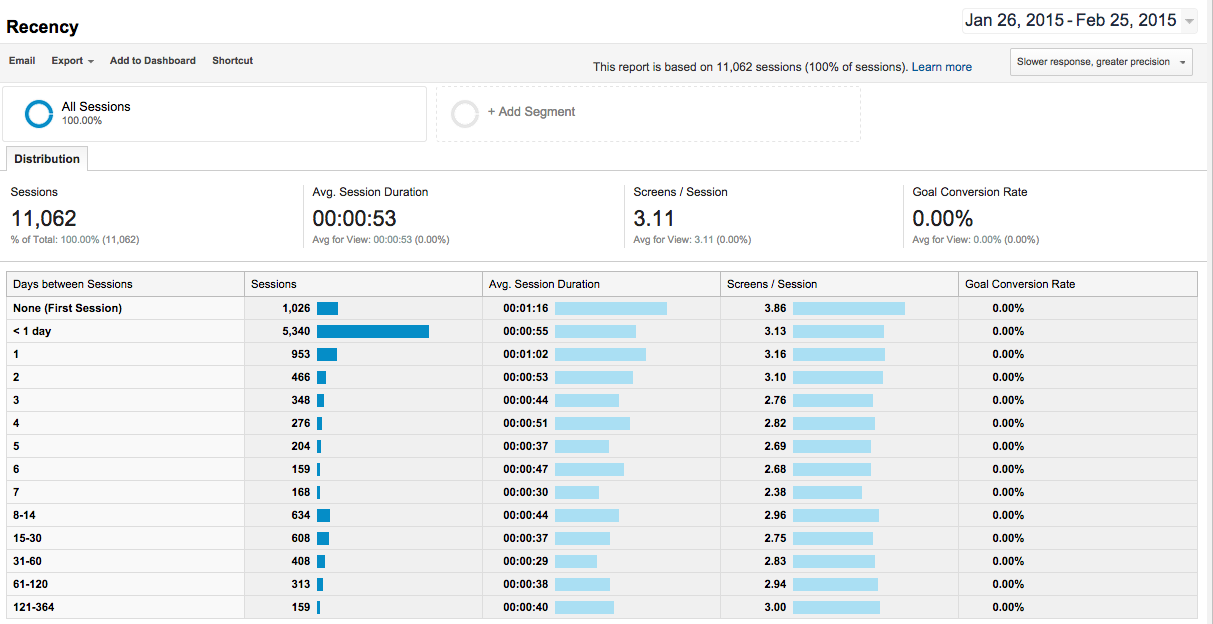
The Recency Report within Google Analytics shows how much time passed between app sessions. This provides a great way to segment users based on frequency of engagement, and enables you to know who uses your app once a month, or once a week, or even once a day. With this information you can begin to target new customers that are similar to your most engaged segment. You could also try using notifications or advertising to bring less engaged users back more frequently.
Google-Analytics-App-Recency-Report-Screenshot
It's critical for your app's growth to have a disciplined and metrics driven approach to understand who uses your app. AdMob has Google Mobile App Analytics built right in, making it easier to discover trends and take action that will directly tie to revenue. Visit our website to learn more about how AdMob can help you understand your users. Until next time, be sure to stay connected on all things AdMob by following our Google+ page.


Posted by Sarah Xie
Mobile Strategic Partner Manager

Tuesday, March 3, 2015

Why we try, buy and say goodbye to mobile games

Today, everyone is a gamer. With smartphones as a constant companion, consumers have easy access to all kinds of mobile apps � and they love to play games. From puzzles, casino, arcade and adventure games, they play whenever they have a free moment. According to AppFigures, in 2014, games was the fastest-growing category in the Google Play Store.

As a developer, understanding why people choose to interact with certain games is the key to success. Understanding this behavior can be the difference between a hit game or a download dud. Let�s take a look at some of the latest industry trends we�re seeing.

How users discover new apps
According to a recent survey with Google/Ipsos, Consumer Mobile Apps Study in 2014, 27% of smartphone app users rely on search engines to find a new app. Search advertising is a key way for you to get your apps discovered and grow your audience.

Why users download games
There are various reasons why someone might download a new game. But according to the same survey, 60% of gaming app users downloaded a gaming app simply because it sounded interesting and fun. Engaging app listings and positive reviews will help you capture their attention.

Why users try games
Consumers love getting things for free. We found that 67% of gaming app users prefer free games supported by ads, rather than paying to download the app. They also love their snack-sized entertainment, with 78% playing games simply to kill time.

Why users stop playing
On the flip side, 61% of game app users say that the reason they quit an app is because they�ve lost interest in it, with 58% of game app users going so far as to uninstall the app after it fails to hold their attention.

Use analytics to help you understand the consumer�s experience in your app � are they experiencing crashes, getting stuck at a certain level, or is something interrupting the flow of the game � so you can give them a better experience and keep them coming back.

We�ve compiled these stats and insights in this easy-to-share infographic below. Also, you can visit www.google.com/admob to learn more about our integration with Google Analytics in AdMob to monetize intelligently.
Why Users Say Goodbye to Mobile Games Infographic
Posted by Desiree Motamedi
Product Marketing, AdMob

Research Methodology - Google/Ipsos, Consumer Mobile Apps Study, 2014
Google partnered with Ipsos MediaCT on the Mobile Apps Consumer Research to uncover consumer smartphone app acquisition and usage behaviors. Online survey was conducted Sep. 12-22, 2014 among 8,470 smartphone users aged 18-64 who have used any smartphone apps in the past 7 days and have used Entertainment, Finance, Gaming, Local, Retail, Social, Tech, or Travel apps in the past 30 days.

Wednesday, February 11, 2015

Love is all around: Improve your site experience with Google Analytics (Part 3 of 4)

Welcome to the third part of our Valentine�s Day blog series. Today, we�ll focus on how Google Analytics can help improve the performance and user experience on your site.

Google Analytics is a powerful tool that can help you analyze the behavior of your site visitors. With Google Analytics, you can gain valuable insights into improving your site.

The very first step is to link your Google Analytics and AdSense accounts in a few easy steps. After your accounts are linked, you can start viewing AdSense reports in Google Analytics.
Here are five ways to improve the performance of your site by analyzing your Analytics reports:

1. Optimize your revenue by identifying top visited pages

Do you know which of your pages receive the most traffic? Check out the �Top Visited Pages� report to identify the pages that are visited the most and where your users spend the majority of their time. You can optimize these pages for higher conversion and engagement. To make the most of these popular pages, check out our best practices for ad placement.

2. Increase traffic by prioritizing top traffic sources

Which sites are driving traffic to your site? The AdSense Referrers Report allows you to identify the key traffic sources visiting your site. By knowing these sources, you can better tailor your content to make your visitors come back to your site.

3. Identify and optimize the last pages viewed on your site

Where do your site visitors leave your site? You can analyze the top exit pages of your site with the Exit Pages report (found under Behavior reports). Optimizing or fixing these pages could help increase the traffic to your site. 

4. Improve user experience by increasing page speed 

How long do your visitors wait to see your content? By using the Site Speed reports, you can view detailed information about the load speed of your pages. Faster pages lead to better user experience. With these reports, identify pages that have a longer load time and start improving them.

5. Get quick insights with In-Page Analytics

Are your users finding what they're looking for on your pages? The Page Analytics Chrome Extension will help you visualize how your users interact with your site. With this tool, you can see where your visitors are focused and optimize your pages for a better experience.

Learn more about how to gain insights from Google Analytics reports with Analytics Academy today.  

Posted by Cansu Ozaras - Publisher Monetization Specialist
Was this blog post useful? Share your feedback with us.

Wednesday, February 4, 2015

8 Things You Didn�t Know About AdMob

We�re constantly improving our platform and want to keep you in the loop. Here are 8 things you might not have known about AdMob.

1. AdMob is more than a banner only network.

AdMob taps into Google�s massive advertising inventory, which includes a variety of formats and also enables us to offer really high fill rates. Competitive CPMs combined with really high fill rates is a strong recipe for long term earning potential.

2. Implementing AdMob won�t slow down your Android app.

AdMob�s SDK is integrated into Google Play services�if you�re in the Play Store, you�ve already integrated the AdMob SDK. Further, there are several simple ways to decrease Google Play services� impact on APK size.

3. There�s a clever way to make sure interstitial ads load instantly for users.

We allow, and highly recommend, preloading of interstitial ads right when a user logs in. It�s an interstitials best practice. If implemented right, there isn�t latency at all.

4. Google Analytics is integrated into AdMob and works for more than websites.

Google Mobile App Analytics has been entirely re-imagined for mobile development. We measure what matters most at all key stages: from first discovery and download to in-app purchases. Best yet, Google Analytics is now fully available in AdMob.

5. AdMob works across all major platforms.

AdMob works for Android, iOS, and Windows Phone. Great examples of succesful cross-platform AdMob users include Dictionary.com and photo sharing app, Picsart.

6. You can update CPMs automatically with AdMob.

AdMob�s Network Optimization feature allows you to automatically update CPMs, helping you easily maximize revenue. This feature continually retrieves the freshest CPMs from each ad network based on historical performance and dynamically reorders them in your mediation stack. This ensures that the ad network with the highest CPM is served.

7. You can mediate on AdMob.

AdMob is a comprehensive mediation platform, supporting mediation of dozens of the top networks in the world.

8. House ad campaigns are free.

You can run as many house ads as you�d like for free. You can read more here about how Japanese game developer, Colopl, has been very successful using interstitial house ads to promote in-app purchases.

Go here to learn more about all that AdMob can do to help you grow your business and stay connected on all things AdMob following our Google+ page.

get-started-with-admob


Posted by the Google AdMob Team

Wednesday, January 28, 2015

Make it a resolution this year to grow your app business with Google Analytics

Would you like to know what pages your users take action on? Or release an ad with more confidence that potential users will click? As we kick off 2015, we�re beyond excited about the opportunities for developers to harness new insights and grow their apps with the power of Google Analytics. Using analytics will give you the data to discover new users, measure engagement, and gauge impact. There�s no time like the present to dive in.

To help you get started, we�re beginning a series of Google+ posts on app analytics resolutions: steps you as a developer can take this year to make better use of your app�s data. Over the next few weeks, our in-house Google Analytics product experts will offer up their own personal recommendations for metrics and reports that you can utilize to gain a deeper understanding of your app�s performance. Scroll on over to our G+ page tomorrow to learn how.

Posted by Becky Bowman
AdMob Global Commercialization Lead

Thursday, December 11, 2014

Deadline Extended! Earn Your Mobile App Analytics Fundamentals Certification by Dec. 18

In November, we introduced the Mobile App Analytics Fundamentals course to provide an opportunity for developers to learn the ropes of mobile app analytics. This self-paced online course is designed to explore the tools and reports that can help you better understand user acquisition and behavior.

Due to an unprecedented number of students joining the course in December, we�ve extended the deadline to earn your course certificate by one week. Students who complete all four course assessments with an overall score of 80% or better by December 18, 2014 at 11:59pm PST, will earn a certificate of completion that can be downloaded from the My Profile page in the course.

Still need to sign up? Register here. The course should take about two to four hours to complete.
Mobile-App-Analytics-Fundamentals
Also, don�t miss the YouTube recording of Product Manager and course instructor, Fontaine Foxworth, discussing common mobile app analytics questions with other Google Analytics experts, including Product Manager, Rahul Oak, and Software Engineer, Andrew Baldwin. Our experts discuss creating a measurement plan, tracking installs and events, and monetization models.

Posted by Becky Bowman
AdMob Global Commercialization Lead

Tuesday, December 9, 2014

Google Analytics in AdMob helps mobile app developer Eltsoft go global

Cross-posted on the Google Analytics blog

Since April 2014, Google Analytics has been fully available in AdMob, and now app developers are increasingly seeing results by combining data from both platforms. Here�s one story that illustrates the power of AdMob and Google Analytics together.

Passion for languages and learning

Jason Byrne, and business partner Robert Diem, are passionate about making a difference in education. They came together during their time as professors in Japan to found Eltsoft LLC, a company that builds mobile language learning apps for iOS and Android. Together, they started creating a series of fun tools that allow users to study whenever they want, wherever they are.

Global expansion

Their most popular app is English Grammar, which has been downloaded by more than a million people looking to sharpen their English-language skills in nearly 120 countries.

All of the company�s apps are available for free or as paid versions. To increase revenue, they chose AdMob to earn money from the free versions of their apps with advertising. �AdMob monetization is central to our success because it delivers high-quality, appropriate ads to our audience in their native languages, wherever they live,� says Jason.

The Google Analytics data within AdMob helped them understand more about their users. "Our app, English Grammar, has users from all around the world, so we turned to data from Google Analytics and AdMob to understand which languages we should consider for localization. For example, we knew we had to prioritize German and French, but we discovered other languages that we didn't expect, such as Russian and Japanese."

A data-driven approach to marketing

Eltsoft uses data to focus their marketing campaigns and assess where to use their resources most effectively. �Google Analytics keeps making campaign analysis simpler and clearer,� Jason says. �Data from various sources - Google Analytics and Google Play, for instance - are now all in one place. That helps me understand what�s happening with our ad campaigns.�

While data analysis helped Eltsoft validate some of their hypotheses, it also uncovered opportunities according to Jason: �The greatest takeaway for me is that the results are never really what I expect. I am often surprised. Analytics has given us great insights into who our users are, and has provided a very important lesson in the value of surveying our user base. Our simple assumptions are often inaccurate.�

Replicating successful strategies

Eltsoft has developed a way to calculate the value of users by using a combination of AdMob metrics (like ad request values) and Analytics metrics (like user counts and sessions per user). Having Google Analytics in AdMob has unlocked such analysis because the data is available in the same interface.

As a result, Eltsoft can now understand what works best for their users. �For example, we�ve made changes to our apps, and Analytics has really helped us to track the effectiveness of those changes. I would say six months ago, that our success was a mystery. The data said we were doing well, but the whys were not clear. Therefore, we couldn�t replicate or push forward. But today, we understand what�s happening and can project our future success. We have not only the data, but can control certain variables allowing us to understand that data.�

�Google Analytics data is literally a goldmine,� says Jason.

If you want to learn more about how Eltsoft is using Google Analytics and AdMob, download the full case study.

Want to learn how to get the most from Analytics in AdMob? Sign up for our free online course, Mobile App Analytics Fundamentals.

Posted by Russell Ketchum
Lead Product Manager, Google Analytics for Mobile Apps

Wednesday, November 12, 2014

Introducing Mobile App Analytics Fundamentals on Analytics Academy

So you�ve built an app? Awesome! But how are you tracking success? Does anyone know about your app? Do you have a good monetization plan?

Today we�re excited to officially announce our newest Analytics Academy course, Mobile App Analytics Fundamentals, designed to help you answer these questions and more.

This is a great resource for all AdMob publishers who want to learn more about how to use Google Analytics in AdMob.

Whether you�re an app developer or an experienced marketer in the mobile app space, knowing the fundamentals of mobile app measurement can help you improve your app marketing and monetization efforts. In this course, you�ll learn how to identify your most valuable users, how to find more of them, and how to tailor your monetization experience for different groups of users.
How it works
In this free online course, instructor Fontaine Foxworth will lead you through a series of conceptual training videos and interactive exercises to teach you about Mobile App Analytics. Throughout the course, she�ll use an example online gaming app called Go Fish!, which will demonstrate common Analytics use cases and help you apply what you learn to your own mobile app.

After the course opens, you�ll have four weeks to earn a certificate of completion while working alongside a worldwide community of Analytics enthusiasts. In total, the course should take between two to four hours to complete.

Ready to sign up? Register now and join us when the course begins on Tuesday, November 18th.

We look forward to your participation in the course!

Posted by Christina Macholan & The Google Analytics Education Team

Monday, October 27, 2014

Share your thoughts on AdMob, AdSense, and other Google developer and publisher solutions

Your thoughts and suggestions play a key role in shaping our publisher and developer offerings. That�s why we�re looking forward to hearing from you in our semi-annual survey launching on November 4th. Make your voice heard by sharing your thoughts, and help us provide you a more useful and impactful publisher experience.

The feedback collected from this survey is closely reviewed to help determine our product roadmap. Thanks to your suggestions last time around, we�ve launched a number of new features and improvements to grow your earnings and improve our service. On AdMob, this included launching a more user-friendly interface, integrating Google Analytics into the new AdMob, and improving revenue tools to include Ad Network Optimization.

To take part, please take the following steps as soon as possible:
  • Update your contact details in your AdMob account
  • Update your email preferences to receive �occasional survey� messages

Whether you�ve completed this survey before or you�re providing feedback for the first time, we�d like to thank you for taking the time to tell us how we�re doing. We�re looking forward to hearing your feedback.

Be sure to follow us on Google+ or subscribe via RSS to take advantage of the latest news and tips on mobile app monetization. We can�t wait to see the amazing apps you build!

Posted by Adriana Satmarean
Publisher Happiness Team, AdSense