Showing posts with label AdSense features. Show all posts

Monday, June 6, 2016

[VIDEO] Multi-screen best practices

We recently launched a set of #AdSense101 videos to help you master AdSense and grow your business. We started with When Will I Get Paid?, and today we continue with a focus on Monetizing for Multi-Screen.

Optimizing your ads for all screens, especially mobile, is a topic we hear about from publishers every day. Watch this short video to learn more about the best-performing mobile ad formats and placements.


Stay tuned for other #AdSense101 videos throughout the year.

Did you find this video useful, or is there something else you�d like to see? Please let us know in the comments below. And be sure to follow us on Twitter and Google+ for more tips and tricks.

Posted by:
Barbara Sarti
Google AdSense team.


Wednesday, May 25, 2016

More personalized recommendations with automatic experiments

Today we�ve launched automatic experiments*, the latest addition to our suite of optimization tools.

Enabling this feature allows us to run automatic experiments on a small portion of your traffic and provide you with insightful data about which ads perform best on your site. This could help you optimize your ads and potentially increase your long-term revenue and user engagement on your site**.

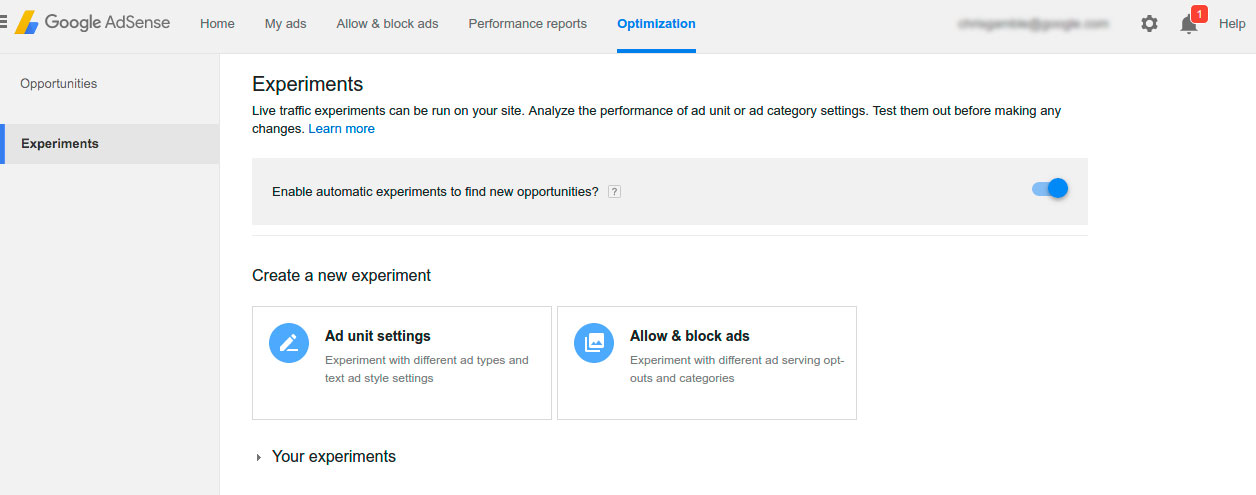
To enable automatic experiments on your site, visit the "Experiments" page on your Optimization tab, and switch on "automatic experiments".


The opportunities generated from these experiments will appear in the �Opportunities� page on your Optimization tab. They'll be labelled "verified by experiment,� so you�ll know they�re backed by data and tailored to your site and users.

To learn more, visit the Help Center.

We'd love to hear your feedback in the comments below!


Posted by Chris Gamble, Software Engineer


*Automatic experiments will appear in your account if you have enough eligible traffic.
**These suggestions are designed to help you optimize your pages and are not meant to guarantee any specific results. And, just as a reminder, you are responsible for the content and layout of your site. 

Tuesday, May 10, 2016

[eBook] Learn how to increase audience engagement

Did you know that roughly 61% of users abandon a site if they don't find what they�re looking for right away?1 As hard as you work to get visitors to your site, you have to work even harder to keep them there.


Unfortunately, there isn�t a clever hack to keeping your users engaged. However, if you understand the intent of your users and provide unique content that�s relevant to their interests, you�ll be on your way to increasing engagement on your site.


Download our guide to audience engagement to learn more about best practices and tips to drive better results for both your users and business. Get your free copy today.


We�d love to hear your feedback on how this guide, connect with us on  Google+ and Twitter using #AdSenseGuide.


Posted by Jay Castro
from the AdSense team


1) Think with Google, What users want from mobile sites

Wednesday, April 13, 2016

More defenses roll out to thwart Clickjacking

At Google we defend our ad systems from fraud using technology in a variety of ways. Often our investment in these defenses goes beyond protecting against only known threats. Our engineering and operations teams are continually working to identify new and emerging threats.  Once a new ad fraud threat is found, we move quickly to defend our systems against it using a combination of technology, operations, and policy.

Recently we identified �Clickjacking� (aka UI Redress) as an emerging threat to cost-per-click display ads, and we�ve rolled out new defenses to protect advertisers against this threat. Clickjacking is a type of web attack where the appearance of a website is changed so that a victim does not realize they are taking an important action, in this case clicking on one or more ads. For example, a user may intend to click on a video play button or menu item, but instead clicks an invisible ad unit.

Figure 1: An example of a clickable ad hidden behind a video playback button.

Moving quickly to thwart Clickjacking attempts
Earlier this year when our operations team identified Clickjacking activity on our display network, they moved swiftly to terminate accounts, removing entities involved in or attempting to use this technique to trick users. Our engineering team worked in parallel to quickly release a filter to automatically exclude this type of invalid traffic across display ads.

This approach delivered a one-two punch to publishers who violated our policies: our operations team, which forms an early line of defense against invalid traffic, cleaned out publishers from our ad systems, while engineers built a new filter as a durable defense to protect against Clickjacking traffic.

Figure 2: An example of mouse-tracking, which leads to a page with lots of ads being opened regardless of where a user clicks.

Even as there are ongoing attempts to perpetrate this type of attack, our ongoing and proactive hunt for emerging types of invalid traffic has enabled us to move early and quickly to address Clickjacking threats on several occasions.


A combination of defenses
Our Clickjacking defenses operate at considerable scale, analyzing display ad placements across mobile and desktop platforms, evaluating a variety of characteristics. When our system detects a Clickjacking attempt, we zero-in on the traffic attributed to that placement, and remove it from upcoming payment reports to ensure that advertisers are not charged for those clicks.

This latest effort also is a great example of how our work against invalid traffic is at the intersection of technology, operations, and policy.  Each piece plays a key role in keeping our ad systems clean and defended against ad fraud.

Equally important, our efforts also promote a level playing field for good publishers on our ad systems.  And while our Ad Traffic Quality team works hard to keep our ad systems clean, we also rely on publishers to do their part in contributing to a healthy ads ecosystem.


Best practices for publishers
Publishers play a crucial role in delivering a good ads experience.  We�ve included some relevant best practices below to remind publishers of ways that they can improve the ads experience on their web properties.

  • Double and triple-check implementations to verify that your sites contain no programming errors, conform to AdSense policies, and display correctly across different browsers and platforms.
  • For mobile devices, plan your layout carefully to accommodate limited screen real estate.
  • Avoid placing ads close to other clickable content to prevent accidental clicks. For more guidance on how to implement banner ads see our best practices video.
  • Monitor analytics often to spot traffic anomalies. For example, setting up Analytics alerts can show if an unusual amount of traffic comes from a particular ad placement or site.
  • Lastly, if you find suspicious activity, please report it via the Invalid Clicks Contact Form.

We�re proud of our work to protect our ad systems against emerging threats like Clickjacking, and we�ll continue to be vigilant as we fight the good fight against ad fraud. 


Posted by: Andres Ferrate, Chief Advocate, Ad Traffic Quality


Friday, January 22, 2016

New year with new opportunities

What�s your New Year's resolution for 2016? If it�s doing what you love while earning money, you can start turning your passion into profit by signing up for AdSense and earning money from your content.  For more information, see our site or hear from our publishers.


If you already have an AdSense account, consider the following alternatives to earn money online:
  • Google Consumer Surveys: Earn incremental revenue beyond ads each time visitors complete short, user-friendly surveys in exchange for access to your content.
  • Google Contributor: With Contributor, anyone can pay a monthly subscription to see fewer ads across the Web. Each time an ad is removed on your site, a thank-you message appears in its place and Contributor helps to fund your content.
  • Google AdMob: If you have an app, you can gain insights about your users, drive more in-app purchases, and maximize your ad revenue with AdMob. 
Happy New Year and see you online!

Google AdSense Team

Wednesday, January 13, 2016

Explore opportunities with the new AdSense Optimization tab

Today, we�re excited to announce the new Optimization tab, a dedicated place in your AdSense account that shows tailored tips for your site. This new tab is a one-stop shop for all the resources that could help you increase your revenue and user engagement on your site.

With the new Optimization tab, you can:
  • Explore new opportunities and features that could boost your income
  • Run A/B experiments and check results to make better decisions for your site
  • Find valuable optimization resources in one place
The new Optimization tab is currently in beta and available for a limited group of publishers. It will roll out to all AdSense publishers over the coming weeks. Check your account now to see if you have this exciting feature in your account!
To create a great optimization experience for you, we�re planning to add more features to the new Optimization tab, including new experiment features and a host of new opportunities. We hope that this new tab will help you explore more opportunities for your site and continue to turn your passion into profit.

We�d love to hear your feedback. Let us know what you think in the comments section below.


Posted by Ben Birt
Software Engineer

Wednesday, December 16, 2015

2015 Year in Review

2015 was a year with new and exciting AdSense updates. Let�s have a look at 2015 to recap all the product enhancements launched this year.


New features for your AdSense account:


  • New sign-up flow: Signing up for AdSense is now faster and easier. Now, you have immediate access to your AdSense account once you sign up for AdSense.
  • New AdSense website and mobile apps: We announced our new AdSense website with a new design and new publisher stories. We also updated the AdSense app with a fresh new look using material design and added some new features. 
  • New AdSense performance reports: To give you quick and easy access to these reports, we introduced a new design for AdSense reporting with a new dashboard. With the redesigned Performance reports tab, you now have more control and flexibility, allowing you to better understand your AdSense earnings and performance.
  • Improved transparency in payments: We've received feedback from you that you want to know more about the differences between estimated and finalized earnings. Now, you�re able to see the invalid activity deductions that cause these differences. 
  • Matched content: To help you grow the number of pageviews on your site and increase user engagement, we launched Matched content. It�s a free content recommendation tool that promotes your content to your site visitors. Matched content generates contextually relevant and personalized article recommendations from the pages on your website. Have a look at the site management settings in your AdSense account to see if your sites are eligible to run Matched content.

New features for your ads: 


  • New mobile text ads: This new design allows for higher performance with a more beautiful and user-friendly appearance. The text ads feature elements such as a shaded background and a centered button which bring together the parts of the ad into a cohesive whole. To see these new mobile text ads, choose to show both text and display ads on your site, if you haven�t already done so.
  • Richer text ads: Richer text ads are a new ad format that automatically creates image ads from text ads. They compete for both your text and display, and display-only ad units and could increase your earnings.
  • Improved "Mute this ad" feature: With �Mute this ad,� users have a way to signal that they aren�t interested in certain ads. This feature gives users additional control over ad units. It also helps us find ad placements and creatives that users may not prefer so that we can continue working hard to serve better performing ads on your site.

We�re looking forward to 2016 with lots of new features and formats to improve your AdSense experience.

As always, we�d like to thank you for sharing your feedback. Please keep sharing your thoughts and suggestions and stay tuned for more updates in 2016.

Happy New Year, and see you online in 2016!

Google AdSense Team
Not yet an AdSense user? Sign up now!

Thursday, October 8, 2015

Signing up for AdSense is now faster and easier

We�ve made it easier and faster to apply for AdSense and get your account approved.

Starting today, you�ll have immediate access to your AdSense account once you sign up. Previously, when you applied for AdSense, you�d need to wait for your account information to be approved before you could access your account and place ad units on your site. Now you can create ad units and place them on your site right after signing up for AdSense.

To get started with AdSense:
  1. Make sure your website is compliant with the AdSense program policies.
  2. Sign up for an AdSense account by enrolling your site.
  3. Add the AdSense ad code to your site.
It typically takes 48 hours for our specialists to complete the site review after you add the code to your site. Until you pass this review step, your ad units will remain blank. Once your site is approved, ads will be displayed on your site and you can start earning money from your content.

Learn more about the new application process in the AdSense Help Center. This new process is now in place for many countries and we're looking forward to even more publishers joining the AdSense family. Let us know what you think in the comments section below.


Nikos Ioannou
AdSense Software Engineer

Monday, September 14, 2015

The AdSense app has a fresh new look

We�ve recently updated the AdSense app with a fresh new look using material design and added some new features. Based on your feedback, we�ve added the following functionality to make it even better:

  • New metrics: View impressions, impression RPM, and CTR of your ads.
  • Support for Hindi and Malay: Use your AdSense app in Malay and Hindi, which have recently joined the AdSense family, as well as in 31 other languages.
  • New reports for Android: Check the performance of different ad sizes, ad types, ad networks, targeting, bid types, and custom date ranges.
  • Today widget for iOS: Check your earnings even quicker on your iPhone in the Today view.

If you haven�t tried the AdSense app yet, download the iOS or Android version today and start checking your AdSense account on the go. Let us know what you think about the new design and what new features you�d like to see in the future.


Posted by Daniel Kenyon-Jones
AdSense Product Manager


Wednesday, August 12, 2015

[Infographic] Hindi content is key to growing an audience in India

Late last year we announced Hindi as the first Indic language supported by AdSense. It means you can earn money by displaying Google AdSense ads on Hindi webpages.

But why does Hindi matter? If you have a large user base in India; or you�re looking to grow in this strategic emerging market; catering your content to Hindi speakers is key. Check out this infographic to learn more:
Keen to start creating? Here are our top five tips for publishing Hindi content online:

1. Create Hindi content that is unique and provides value to your users.
Check out Google Trends in Search and YouTube to see what�s popular in India right now. You can also see a selection of high quality Hindi content from fellow publishers at hindiweb.com.

2. Get a professional translation, or have a native speaker review content.
If you plan to translate your site for Hindi speakers, ensure you provide good quality translations. Avoid auto-translation as it risks a low quality user experience. Read the Webmaster Quality Guidelines to learn more.

3. Be multi-screen and fast-loading.
Delight users with a mobile-friendly site that works well even on low-bandwidth connections. Explore these multi-screen guidelines to get your site ready.

4. Use Devanagari script. 
Access up to 40 free, beautiful fonts for publishing your Hindi content and benefit from better indexing of your site. Select Devanagari script at Google Fonts to add fonts to your collection.

5. Monetize with Google AdSense.
You can use your existing Google AdSense account and create a new ad unit to get started. If you�re new to AdSense, sign up now

We look forward to seeing the content you create in Hindi.


Posted by Amelia Walkley
Marketing Communications Specialist

Thursday, August 6, 2015

Increasing advertiser competition on your site with the new richer text ads

To help you make more money for your image-only ad units, we previously launched the magazine ad format. Today, we�re happy to introduce richer text ads, a new ad format that automatically creates image ads from text ads. The new richer text ads compete both for your text and display, and display-only ad units and could increase your earnings even more.

This new ad format, inspired by material design, adheres closely to the advertiser�s brand by using their logos and brand colors. This enables brand advertisers who are particularly sensitive to how their text advertisements are displayed to spend more on the Google Display Network, thereby increasing competition for the ad units on your site.


If you currently have text and display or display-only ads on your site, richer text ads will automatically be set up for your site. If you�d prefer not to show richer text ads, you can disable them through the Enhanced display ads option in the Allow & block ads tab in your account.

We�d love to hear your thoughts on our new richer text ad format! Share your feedback in the comments section below this post.


Posted by Daniel Kaemmerer
AdSense Product Manager

Wednesday, April 22, 2015

Introducing Matched content: a new way to help your visitors discover content on your site

Today we're introducing Matched content, a free content recommendation tool for AdSense publishers that promotes your content to your site visitors. Matched content generates contextually relevant and personalized article recommendations from the pages on your website.

With Matched content, your visitors can:

  • Discover relevant articles on your site
  • Spend more time on your pages
  • Engage more with your content

This new feature can help you increase your site's page views and ad impressions, and could increase your ad revenue by making it easy for your visitors to find your content. To provide a great experience for you and your site visitors, Matched content is available for sites with multiple pages and high volumes of traffic. Have a look at the site management settings in your AdSense account to see if your sites are eligible to run Matched content.
Adding Matched content units to your site now could help you to grow the number of page views on your site and increase user engagement. You can get the most out of this new tool by checking the best practices in the AdSense Help Center.

We'd love to hear your thoughts about this new feature in the comments section below this post.

Posted by Tobias Maurer, Matched Content Product Manager
Was this blog post useful? Share your feedback with us.

Thursday, April 9, 2015

New AdSense performance reports deliver quick and easy insights

Your performance reports are the key to gaining insights into how much you're earning and what impacts those earnings. To give you quick and easy access to these reports, we�ve introduced a new design for AdSense reporting with a new dashboard.
Fig 1. New Performance reports tab
With the redesigned Performance tab, you now have more control and flexibility, allowing you to better understand your AdSense earnings and performance. Some of the highlights of the new performance reports include:
  • Easier analysis: Get deeper insights by adding, changing or removing dimensions with the simple, redesigned dimension selector.
  • Simple metrics: Better understand your earnings with the redesigned metric families. We've designed metric families to group related reporting metrics and separate the different ways you make money from ads. For instance, the Clicks metric family includes metrics that relate to the CPC bid type.
  • Flexible reporting: Configure your filters the way you want. You can now apply multiple filters to your reports with the redesigned multiple filtering. For instance, you can now filter your Ad sizes report by both the country and platform dimension.
Fig 2. New reporting dashboard
To give you a centralized view of your account�s performance, we�ve also built a new reporting dashboard. With the new reporting dashboard, you can:
  • Access your top performance metrics: Switch easily between three key performance metrics: Estimated earnings, pageviews, and page RPM.
  • Understand what�s driving your key metrics: Analyze your top performance metrics by five different dimensions: Time, top platforms, top countries, top channels, and top sites.
  • Perform detailed analysis: View more detail for any report in the dashboard by clicking on �View report.� 
To see your new AdSense reporting design and reporting dashboard, opt in below. Alternatively, you can opt in from within the Performance reports tab in your AdSense account. 
Start using new AdSense reporting today and let us know your thoughts in the comments below.

Posted by Agnieszka Janowska and Daniel Kenyon-Jones, AdSense Reporting Team
Was this blog post useful? Share your feedback with us.


Thursday, April 2, 2015

AdSense now speaks Malay

We�re happy to announce that starting today AdSense supports content in Malay (Bahasa Melayu), the national language of Malaysia, and one of the fastest growing languages on the Web.

By adding Malay to the family of AdSense supported languages, we hope to support publishers in creating even more great quality web content in Malay, and connect advertisers to a rapidly growing online audience.

If you already have a website in Malay, follow the steps below to start earning money with relevant ads on your website. If you were already thinking of creating a website in Malay, now you have one more reason!

  1. Make sure your website is compliant with the AdSense program policies.
  2. Sign up for an AdSense account by enrolling your Malay website.
  3. Once your AdSense account has been approved, simply add the AdSense code to start displaying relevant ads to your users.

Selamat datang ke AdSense!
Welcome to AdSense!

Posted by Emanuele Brandi, Product Sales Lead on behalf of the AdSense Internationalization Team
Was this blog post useful? Share your feedback with us.

Monday, February 23, 2015

Introducing the new AdSense Revenue profile

Starting today, a new Revenue profile report will be available in your AdSense account. Currently, AdSense reporting shows you an average of your ad request RPM. This new report will help you understand the value of your top performing ad requests in more detail.

The AdSense ad auction handles billions of ad requests each day, channeling demand from AdWords advertisers and Google certified ad networks (via the DoubleClick Ad Exchange) to our publishers. This real-time digital ad marketplace works to serve high paying ads on your site. Now, you will be able to see the performance of these valuable ads. For example, you can now see the RPM of the top 5% of ads performing on your site.


To make sure you're getting the most out of the ads on your site, follow these best practices:

The new Revenue profile report is available if your AdSense account receives a minimum number of ad requests. It currently offers an aggregate view of your account and we are working to offer a more complete picture with detailed reporting in the future.

Find out more about the new Revenue profile in the AdSense Help Center and let us know what you think about this feature in the comments section below.

Posted by Nick Radicevic - AdSense Product Manager
Was this blog post useful? Share your feedback with us.

Monday, February 2, 2015

Adding more functionality to the "mute this ad" feature

A few years ago we launched a product called "Mute this ad" - a small [x] that appears in the corner of some display ads on the Google Display Network. When a user clicked the [x], they no longer saw ads from that particular ad campaign.

We�ve found that increased user control benefits the entire ads ecosystem, so we�ve launched features and products like "Mute this ad" and TrueView ads on YouTube to give users more control over ads they see online. With �Mute this ad,� users have a way to signal that they aren�t interested in certain ads, advertisers no longer pay to show ads to users who aren�t interested, and publishers like you show better performing (and potentially more valuable) ads on your site.

Now with �Mute this ad�, when a user clicks on the Mute button "[x]" and completes a short survey, when possible, the ad disappears from the page. The space previously occupied by the ad collapses smoothly, allowing the content surrounding the ad to fill the space.
This new feature gives users additional control over ad units. It also helps us find ad placements and creatives that users may not prefer so that we can continue working hard to serve better performing ads on your site.

As always, we�d love to hear your feedback. Tell us what you think about this new feature in the comment section below this post.
Michael Aiello - Product Manager
Was this blog post useful? Share your feedback with us.

Monday, December 29, 2014

2014 Year in Review

The end of the year is approaching and before we say goodbye to 2014, we'd like to recap all the AdSense product enhancements launched this year.

Multi-screen additions: 
  • Responsive ad units 
Responsive ad units can help you provide a great ad experience for users on every screen (i.e., computers, phones, tablets) if you have a responsively designed website. To make your code simpler and save you time and effort, our responsive ad code automatically adapts the ad unit size to your page layout.
  • Multi-screen scorecard
Check the new multi-screen category in your publisher scorecard to see what percentage of your pages are multi-screen optimized, and review how this compares to other AdSense publishers.
  • Tools for building multi-screen sites
New to multi-screen? The AdSense Multi-Screen guidelines can help you get started on or improve your mobile site. For more technical resources on developing a mobile website, visit the Web Fundamentals course and the Web Starter Kit.

Ad unit updates:
  • Custom size ad units
Creating custom ad unit sizes for your website will give you the flexibility to design your ads and your site to fit your audience. We now have 434,216 new ad unit options which behave just like their standard sized counterparts.
  • New ad sizes
Increase the flexibility of your ad units with the the new Billboard (970 x 250) and Portrait (300 x 1050) ad unit sizes. Learn how these sizes can help you reach more advertisers while also enhancing user experience and engagement on your site.

New features in your AdSense account:
  • New features in the Ad review center
Discover how filtering reviewed ads, searching by ad sizes, and finding related ads can give you more control. Learn more about these new Ad review center features.
  • A/B testing for categories in the AdSense interface
Interested in testing how blocking certain ad categories changes your site�s revenue? Now you can run A/B experiments without changing your ad code to better understand how to use ad category settings to your advantage.

Toolbar and plugin updates:
  • View Google Analytics data in the Google Publisher Toolbar
You can now view visitor data from Google Analytics in the Google Publisher Toolbar. Learn how to install the Google Publisher Toolbar and use Google Analytics insights while you browse your pages.
  • AdSense Plugin for WordPress
Using Google products within WordPress just got easier. Link your WordPress site to your AdSense account, easily place ads, and check your page visibility with the AdSense Plugin for WordPress.

We�d like to thank you for sharing your feedback about these launches over the past year. Please keep sharing your thoughts and suggestions through our AdSense +page and stay tuned for more AdSense updates in 2015.

Happy New Year, and see you online in 2015!

Posted by Lizzie Pace and Yigit Yucel - Inside AdSense Team
Was this blog post useful? Share your feedback with us.

Sunday, December 14, 2014

AdSense now speaks Hindi

We're proud to announce that AdSense now supports Hindi, one of India's most widely spoken languages.

With over 500 million speakers around the world*, a wealth of quality Hindi content is available on the web.  We�re excited to launch AdSense Hindi language support today to help fuel even more quality content creation on the web, and to help advertisers connect with a rapidly growing online audience.
If you have a website in Hindi, you'll now be able to earn money by displaying Google AdSense ads on your website. To get started:
  1. Make sure your website is compliant with the AdSense program policies.
  2. Sign up for an AdSense account by enrolling your Hindi website.
  3. Once your AdSense account has been approved, simply add the AdSense code to start displaying relevant ads to your users.
?????? ????????? ??? ???? ?????? ??!
Welcome to AdSense!

Posted by Emanuele Brandi, Product Sales Lead on behalf of the AdSense Internationalization Team

* Source: Encyclopedia Britannica
Was this blog post useful? Share your feedback with us.

Wednesday, October 29, 2014

Linking Google Analytics with your Google AdSense account just became easier

If you want to grow your website and your ad revenue, you need to understand your audience. Google Analytics is a powerful tool that helps you better understand your site visitors and define the right strategy for your site.

We've recently improved how Google Analytics links to your AdSense account, making it easier than ever to understand what's working on your site. With this new update, you can link your AdSense account within Google Analytics in fewer steps and can also link your AdSense account to multiple Google Analytics accounts.

If you haven�t linked Google Analytics with your AdSense account yet, it�s a good time to learn more about your audience. Linking these accounts can help you:

  • Optimize your website: Identify opportunities across traffic sources, geographies, devices, pages and browsers.
  • Improve user experience: See which pages are popular among your visitors and which pages drive them away. Understanding where your visitors� attention is focused will also help you to place your ads where users are most likely to look at them.
  • Grow revenue: Make changes based on how earnings are affected by aspects of user behaviour such as visit frequency and page depth.
Learn how to link Google Analytics with your AdSense account in our Help Center and start identifying revenue opportunities. If you don�t have a Google Analytics account, you can easily set up your account now.

As always, we�d love to hear your feedback. Tell us what you think and share your insights from Google Analytics in the comment section below this post.

Posted by Matthew Anderson - Product Manager Publisher Analytics
Was this blog post useful? Share your feedback with us.
Friday, October 10, 2014

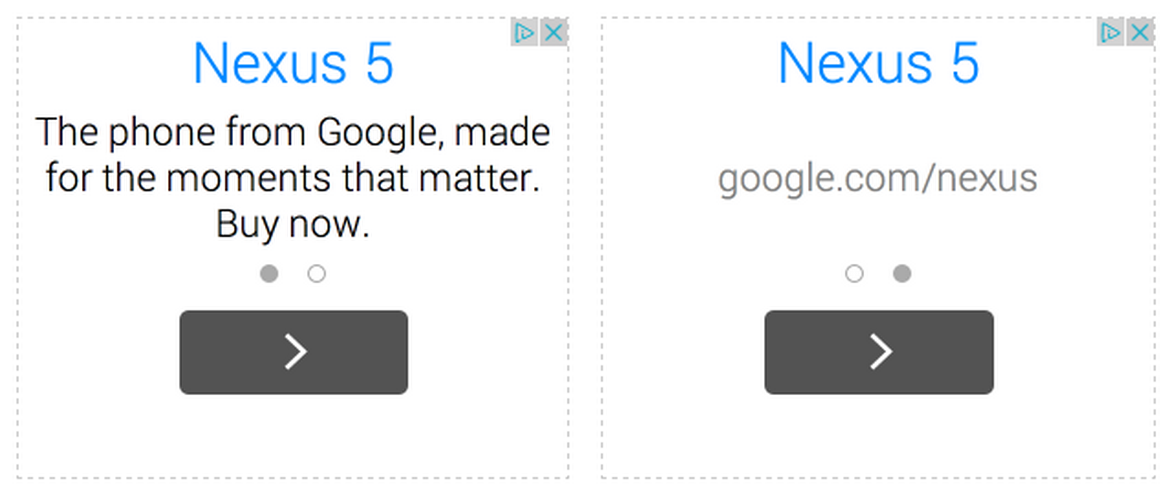
A more mobile-friendly look for text ads on the Google Display Network

Readability and appearance are essential elements of a positive mobile user experience. With that in mind, we�ve made some changes to the design of our text ads on the Google Display Network.

The title and description in the new text ads will now be easier for your mobile users to read. Your site visitors will be able to quickly understand what the ad is about because the ad description will be more prominent. In addition, the ad format will give them a more interactive experience, letting them swipe across or click on the dot to see the advertiser website URL.

Be on the look out for our new text ads and tell us what you think of this redesign over on our AdSense +page.

Posted by Amit Mhatre - AdSense Software Engineer & Pasha Nahass - AdSense Product Manager
Was this blog post useful? Share your feedback with us.