Showing posts with label Other Google products. Show all posts

Friday, January 22, 2016

New year with new opportunities

What�s your New Year's resolution for 2016? If it�s doing what you love while earning money, you can start turning your passion into profit by signing up for AdSense and earning money from your content.  For more information, see our site or hear from our publishers.


If you already have an AdSense account, consider the following alternatives to earn money online:
  • Google Consumer Surveys: Earn incremental revenue beyond ads each time visitors complete short, user-friendly surveys in exchange for access to your content.
  • Google Contributor: With Contributor, anyone can pay a monthly subscription to see fewer ads across the Web. Each time an ad is removed on your site, a thank-you message appears in its place and Contributor helps to fund your content.
  • Google AdMob: If you have an app, you can gain insights about your users, drive more in-app purchases, and maximize your ad revenue with AdMob. 
Happy New Year and see you online!

Google AdSense Team

Tuesday, October 27, 2015

We heart Contributor: Heres why you will too

You might have heard about Contributor through recent posts from the Google team, publishers, and the press. Today we want to share more about the product and provide you an easy way to promote this new revenue source to your site visitors.

Think about your own experience surfing the web. Are there publishers whose content you particularly love and keep going back to? Do you wish you could support these publishers, but see fewer ads? Weve learned that users want an option to directly support the open web and the people who make it hum with great content, while also seeing fewer ads.

We understand that as a publisher your most pressing concerns are keeping your users happy and generating revenue to support your business. Contributor presents a new option to meet both of these goals.

Heres how it works
With Contributor, users pick a monthly contribution level (of $2, $5, or $10) and those funds are used to pay for the sites they visit.
By choosing to contribute to publishers, users essentially participate in the ad auction. If the users bid wins, no ad is shown, but youll get paid by Google as you normally do when ads are served.

Help spread the word
Let your visitors know about Contributor by putting a customized Contributor badge on your site.
Find out how and learn about more ways you can help spread the word here. And if youre interested in seeing how it works, try Contributor for yourself.


Posted by David Stanke
Contributor Product Manager

Tuesday, April 14, 2015

Is your website ready for mobile-friendly Google search results?

Recently, we announced that Google Search will be using mobile-friendliness as a search ranking signal. This change will affect mobile searches in all languages worldwide and will have a significant impact in Google Search results. Make sure your website is ready for this search change. Here are some frequently asked questions that can help you.

How can I check if my site is mobile-friendly? 

You can check your site by testing your pages with the Mobile-Friendly Test tool. This tool shows how Google Search sees your pages. To get a list of mobile usability issues across your sites, log in to your Webmaster Tools account and use the Mobile Usability Report.

How can I make my site mobile-friendly?

Get started with the guide to mobile-friendly sites to build your mobile-friendly site. If you need more customized advice for publishers, you can check out the AdSense Multi-Screen Starter Guide.  

My website is already mobile-friendly. Do I need to take any action?

If you already have a mobile-friendly site:
Go mobile today to provide your visitors a good user experience and to make most of your mobile traffic.

Posted by Inside AdSense Team
Was this blog post useful? Share your feedback with us.

Tuesday, March 3, 2015

Google Search results just became more mobile-friendly

(Originally posted on the Webmaster Central Blog)

As more people use mobile devices to access the Internet, Google Search has adapted its algorithms to help users find mobile-friendly web pages and apps. Recently, Google Search has made it even easier for users to discover multi-screen content with two important changes:

1. More mobile-friendly websites in search results

Starting April 21, Google Search will be expanding its use of mobile-friendliness as a ranking signal. This change will affect mobile searches in all languages worldwide and will have a significant impact in Google Search results. Users will find it easier to get relevant, high quality search results optimized for their devices.

To make sure your website is ready for this change, check out the guide to mobile-friendly sites and start building your multi-screen website today. You can test out how your site is performing with the following tools:


If you already have a multi-screen website, check out our Multi-Screen Implementation Guide to optimize your website for the best user experience and monetization. You can use the Mobile Search Engine Optimization guide to help your site show up in search results.

2. More relevant app content in search results

Recently, Google Search began to use information from indexed apps as a factor in ranking search results displayed to signed-in users who have the app installed. As a result, Google Search may now show content from indexed apps more prominently in search. If you have a mobile app, learn more about App Indexing, and allow Google Search to show this information in search results.

Posted by Inside AdSense Team

(Original post by Takaki Makino, Chaesang Jung, and Doantam Phan)

Thursday, February 19, 2015

Google Consumer Surveys: An additional way to monetize your site

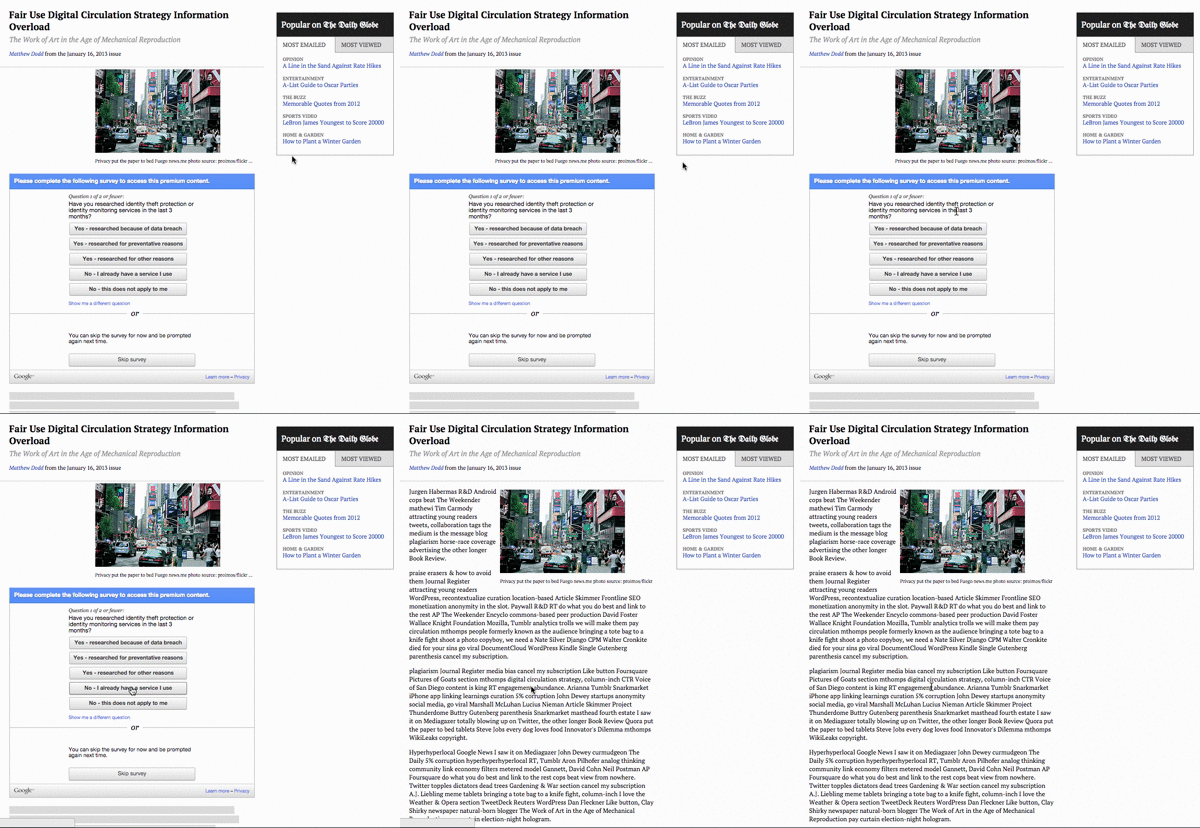
Google Consumer Surveys is a great way for publishers to create an additional revenue stream for their content. When a user visits your site, they will have the option to answer a few survey questions in exchange for access to content. Each time a site visitor answers a survey question, you will earn $.05. Check out how Times Publishing Company generated incremental revenue with Google Consumer Surveys.
Example of Google Consumer Surveys on a news page
Highlights of Google Consumer Surveys include:
  • Earn $0.05 or local equivalent for each answered question
  • Easy to implement
  • You decide where and how surveys are shown
  • Survey prompt appears inline as visitor views content 

Join the 700+ sites that are currently using Google Consumer Surveys as a new way to successfully monetize their content.  Use your existing AdSense account and start earning additional revenue for your site. Currently available in the US, UK, and Canada with plans to roll out to more countries soon.
To learn more, check out Google Consumer Surveys website

Posted by Amy Adams Harding - Head of Publisher Development

Monday, December 29, 2014

2014 Year in Review

The end of the year is approaching and before we say goodbye to 2014, we'd like to recap all the AdSense product enhancements launched this year.

Multi-screen additions: 
  • Responsive ad units 
Responsive ad units can help you provide a great ad experience for users on every screen (i.e., computers, phones, tablets) if you have a responsively designed website. To make your code simpler and save you time and effort, our responsive ad code automatically adapts the ad unit size to your page layout.
  • Multi-screen scorecard
Check the new multi-screen category in your publisher scorecard to see what percentage of your pages are multi-screen optimized, and review how this compares to other AdSense publishers.
  • Tools for building multi-screen sites
New to multi-screen? The AdSense Multi-Screen guidelines can help you get started on or improve your mobile site. For more technical resources on developing a mobile website, visit the Web Fundamentals course and the Web Starter Kit.

Ad unit updates:
  • Custom size ad units
Creating custom ad unit sizes for your website will give you the flexibility to design your ads and your site to fit your audience. We now have 434,216 new ad unit options which behave just like their standard sized counterparts.
  • New ad sizes
Increase the flexibility of your ad units with the the new Billboard (970 x 250) and Portrait (300 x 1050) ad unit sizes. Learn how these sizes can help you reach more advertisers while also enhancing user experience and engagement on your site.

New features in your AdSense account:
  • New features in the Ad review center
Discover how filtering reviewed ads, searching by ad sizes, and finding related ads can give you more control. Learn more about these new Ad review center features.
  • A/B testing for categories in the AdSense interface
Interested in testing how blocking certain ad categories changes your site�s revenue? Now you can run A/B experiments without changing your ad code to better understand how to use ad category settings to your advantage.

Toolbar and plugin updates:
  • View Google Analytics data in the Google Publisher Toolbar
You can now view visitor data from Google Analytics in the Google Publisher Toolbar. Learn how to install the Google Publisher Toolbar and use Google Analytics insights while you browse your pages.
  • AdSense Plugin for WordPress
Using Google products within WordPress just got easier. Link your WordPress site to your AdSense account, easily place ads, and check your page visibility with the AdSense Plugin for WordPress.

We�d like to thank you for sharing your feedback about these launches over the past year. Please keep sharing your thoughts and suggestions through our AdSense +page and stay tuned for more AdSense updates in 2015.

Happy New Year, and see you online in 2015!

Posted by Lizzie Pace and Yigit Yucel - Inside AdSense Team
Was this blog post useful? Share your feedback with us.

Thursday, December 4, 2014

Helping users find mobile-friendly pages

(Originally posted on the Google Webmaster Central Blog)

Have you ever tapped on a Google Search result on your mobile phone, only to find yourself looking at a page where the text was too small, the links were tiny, and you had to scroll sideways to see all the content? This usually happens when the website has not been optimized to be viewed on a mobile phone.

This can be a frustrating experience for our mobile searchers. Starting today, to make it easier for people to find the information that they�re looking for, we�re adding a �mobile-friendly� label to our mobile search results.


This change will be rolling out globally over the next few weeks. A page is eligible for the �mobile-friendly� label if it meets the following criteria as detected by Googlebot:
  • Avoids software that is not common on mobile devices, like Flash
  • Uses text that is readable without zooming
  • Sizes content to the screen so users don't have to scroll horizontally or zoom
  • Places links far enough apart so that the correct one can be easily tapped
If you want to make sure that your page meets the mobile-friendly criteria:
The tools and documentation above are currently available in English. They will be available in additional languages within the next few weeks.

We see these labels as a first step in helping mobile users to have a better mobile web experience. We are also experimenting with using the mobile-friendly criteria as a ranking signal.

If you have any questions or want to help others make mobile-friendly sites, visit our Webmaster Help Forum. We hope to see many more mobile-friendly websites in the future. Let�s make the web better for all users!

Posted by Ryoichi Imaizumi and Doantam Phan, Google Mobile Search

For AdSense publishers: Don�t forget to check our Multi-Screen Starter Guide to start building your mobile-friendly website today.

Wednesday, October 29, 2014

Linking Google Analytics with your Google AdSense account just became easier

If you want to grow your website and your ad revenue, you need to understand your audience. Google Analytics is a powerful tool that helps you better understand your site visitors and define the right strategy for your site.

We've recently improved how Google Analytics links to your AdSense account, making it easier than ever to understand what's working on your site. With this new update, you can link your AdSense account within Google Analytics in fewer steps and can also link your AdSense account to multiple Google Analytics accounts.

If you haven�t linked Google Analytics with your AdSense account yet, it�s a good time to learn more about your audience. Linking these accounts can help you:

  • Optimize your website: Identify opportunities across traffic sources, geographies, devices, pages and browsers.
  • Improve user experience: See which pages are popular among your visitors and which pages drive them away. Understanding where your visitors� attention is focused will also help you to place your ads where users are most likely to look at them.
  • Grow revenue: Make changes based on how earnings are affected by aspects of user behaviour such as visit frequency and page depth.
Learn how to link Google Analytics with your AdSense account in our Help Center and start identifying revenue opportunities. If you don�t have a Google Analytics account, you can easily set up your account now.

As always, we�d love to hear your feedback. Tell us what you think and share your insights from Google Analytics in the comment section below this post.

Posted by Matthew Anderson - Product Manager Publisher Analytics
Was this blog post useful? Share your feedback with us.

Thursday, September 18, 2014

Grow your multi-screen audience with Google Play Newsstand

If you have a news, sports, lifestyle, entertainment or other article-based site, target a growing mobile audience with Google Play Newsstand. Google Play Newsstand gives users the opportunity to discover more of the content they love in one place, and enables you to reach users through your own customizable Newsstand edition.
Use Google Play Newsstand Producer to create your edition and deliver your content to more mobile users. This tool allows you to customize the look and feel of your content, add branding, and set up ads and subscription streams for your Newsstand edition. Once your edition is live, share it with your users so they can subscribe and enjoy your content online or offline. Your users can share your content with others and bookmark articles they find relevant and interesting.

It�s easy to get started, first sign up for Google Play Newsstand Producer and then create your edition.

We�d love to hear from you, tell us in the comments section below this post about your favorite content distribution strategies.

Posted by Jay Castro - Audience Development Specialist
Was this blog post useful? Share your feedback with us.

Thursday, August 28, 2014

Get twice the insights with new Google Analytics integration in the Google Publisher Toolbar


If you�re seeking rich insights and key information on your site�s performance or user behavior, it�s likely you�re already using the Google Publisher Toolbar or Google Analytics. Starting today, access more insights directly from your site pages in just one click, with the integration of Google Analytics in the Google Publisher Toolbar.


In addition to giving you blocking controls and up-to-date information on how your site is performing, the Google Publisher Toolbar now offers more insights on user behavior powered by Google Analytics. Understand your users and shape your audience development strategy with more insights into user demographics and traffic sources. Also, find out which sections of your pages are most popular with your users through In-Page Analytics. As with current information from the Google Publisher Toolbar, you can access this new data directly from your pages when viewing them on Chrome.

Google Analytics is now integrated by default in the Google Publisher Toolbar. More information can be found in our Help Center.

If you�re not yet using the Google Publisher Toolbar, download it today from the Chrome Web Store. As always, we�d love to hear your feedback on this new release. Tell us what you think in the comment section below this post.

Posted by: Araceli Checa, Software Engineer
Was this blog post useful? Share your feedback with us.

Wednesday, February 26, 2014

Frequently asked questions around using Google Analytics 6 of 6

Over the past five weeks of the Google Analytics insights blog post series we�ve looked at how to use Google Analytics to grow your business, optimize your mobile presence, increase user loyalty with Google and improve your overall user experience. We�ve also collected all of your questions to create a video covering the most frequently asked questions.

(Turn on English captions by using the captions button at the bottom of the YouTube video)

The video starts by exploring how integrating your AdSense account with Analytics gives you data that�ll help you optimize content, improve user experience and ultimately, increase your revenue. We then give you a demo so that you can get started straight away. If you�re interested in getting a better understanding of how visitors interact with your online content then you�ll enjoy the section about Universal Analytics and Demographic and Interest reporting. Don't forget to check out our help resources for additional information on each topic covered in this video:


We hope you�ve found the series to be useful. Many thanks for all of your comments and questions over the past five weeks.

Posted by Cemal Buyukgokcesu - Google Analytics Specialist
Was this blog post useful? Share your feedback with us.

Wednesday, January 29, 2014

Optimize your mobile presence with Google Analytics 2 of 6

How does your site perform across devices? With multi-device usage growing rapidly, understanding how mobile users access and interact with your site�s pages is becoming more and more essential. You can use Google Analytics to measure mobile sites and apps interaction as well as visits from web-enabled mobile devices, including both high-end and basic phones and tablets. Check out the following tips to grow your mobile presence with insights from Analytics.

1. Use Mobile App Analytics to measure the end-to-end value of your app
Mobile is changing the way that people communicate, work and play, and much of the growing adoption and innovation is driven by mobile apps. With Mobile App Analytics, you can measure your entire user journey on your app from first discovery and download to in-app purchases and engagement, helping you make better, data-driven decisions for mobile investment. Watch this video for more details on monetizing your app with AdMob.


2. Make sure your user experience delivers across devices
Google Analytics mobile reports can be found under the Audience section on the Reporting tab. They show you statistics by location which lets you understand the current origins of mobile traffic, and make predictions about where traffic will increase. With key insights and metrics such as which devices are driving traffic to your site, bounce rates and visit duration, you can design your website to give visitors what they need on smaller smartphone screens as well as tablets and desktops.


3. Consider different strategies for multi-screen and set goals for mobile monetization
There are no rules around mobile strategies, but mobile sites need clearly defined goals in order to be successful. For example, your goals might revolve around engagement and visits. If you have location-specific content, you may want to incorporate local elements into your mobile offering. Your site goals should align with the needs of your users. Google Analytics mobile reports provide a breakdown of visitors by whether or not they visit using mobile devices. Use this information to shape your multi-screen strategy. If you�d like to place ads on a mobile site designed for users of high-end devices, use AdSense for content to create your ad units.

To help you optimize your mobile presence, we�ve created a custom Mobile Key Metrics Dashboard for you to download. Once downloaded, just select which profile you�d like to import. You can access this dashboard any time by clicking �Dashboards� under the Reporting tab in your Analytics account.

Don�t forget to submit any questions you have on the topics covered in this blog post. We�ll share a video at the end of this series answering your top questions. Next week, we�ll continue our blog series, looking at how specific Analytics insights can help you grow user loyalty on your site.


Posted by Cemal Buyukgokcesu - Google Analytics Specialist
Was this blog post useful? Share your feedback with us.